AI Vacation Planning: How the Kira Assistant Handles Absences for You
AI vacation planning sounds like a far-off promise – yet the medishift assistant Kira already takes absences off your plate today. We show you what AI vacation planning really does, where it is heading, and how to start right away.
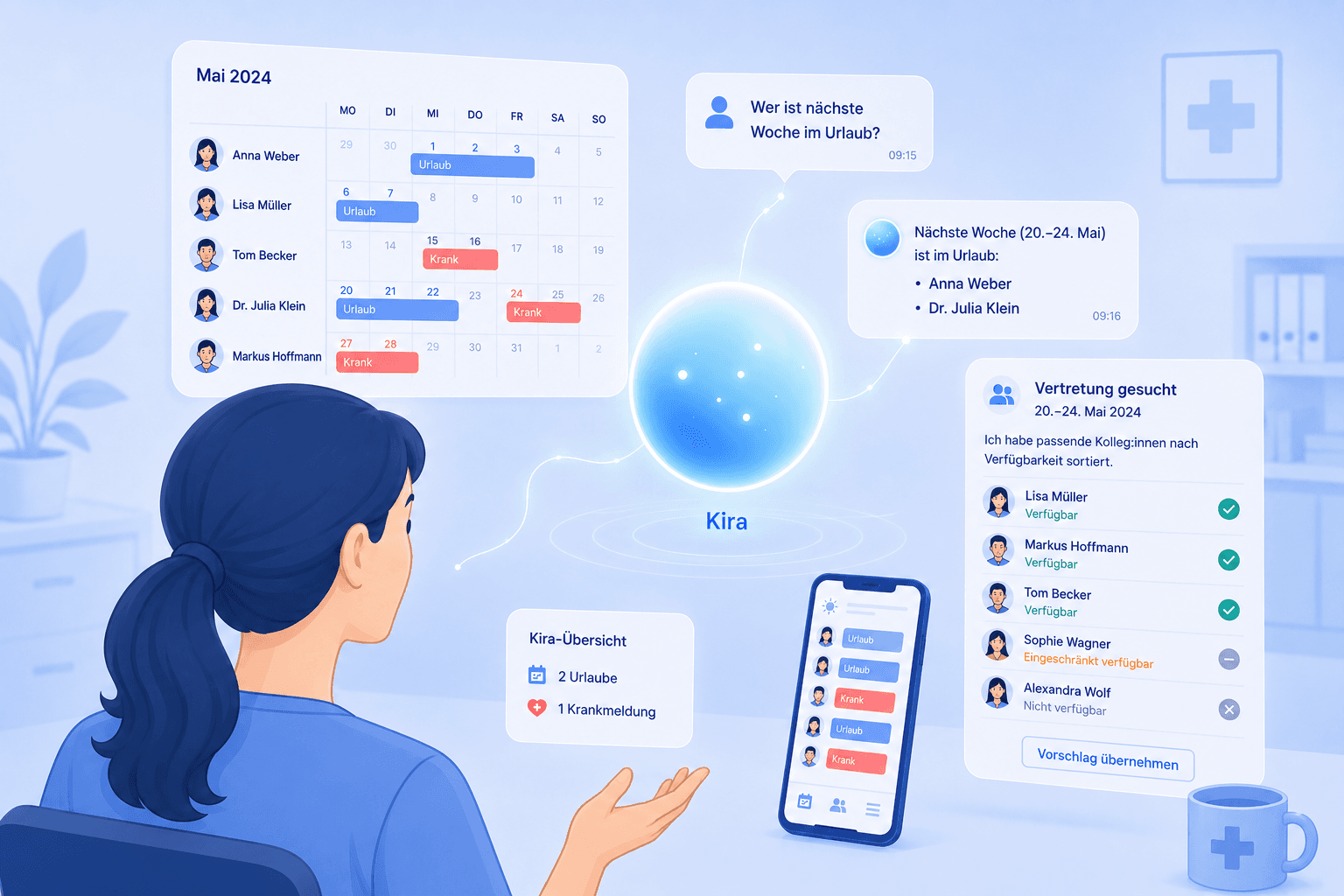
Table of Contents
Picture asking your schedule a simple question: "Who's on vacation next week?" – and getting an instant answer. That's exactly what AI vacation planning is about: you describe what you need in plain language, and an AI assistant does the busywork for you. In medical practices, care services and small teams, absence planning still eats up hours today – vacation requests, sick notes, replacements, all by hand. In this article we show you what AI vacation planning really delivers today, where the honest line between marketing and reality sits, and how to start in your practice right away – without months of data cleanup first.
Key takeaways at a glance
- AI vacation planning means: you give an assistant instructions in natural language, it creates absences and answers questions about your plan.
- At medishift this role is filled by the assistant Kira – it logs vacations and sick notes on request and tells you who is available when.
- Live today: creating absences, spotting scheduling conflicts, replacement requests with colleagues sorted by availability.
- Our next step: Kira proposing a suitable replacement on its own when someone calls in sick, and filling the shift on your click.
- You don't need a perfect data foundation: the more complete your data, the better the result – but you can start right away.
What is AI vacation planning?
AI vacation planning describes the move from the classic digital vacation list to an assistant you talk to like a colleague. With classic digital vacation planning you enter requests into a calendar, check overlaps yourself and keep remaining leave in your head. With AI vacation planning an AI takes over the recurring steps: it understands sentences like "Log Lisa as on vacation from August 12 to 23" and performs the action directly in the plan.
The honest framing of AI vacation planning matters. Today, no machine writes your entire yearly plan overnight on its own – right now the assistant takes the tedious typing off your hands and answers your questions instantly. The decision – who gets time off when, which replacement fits – still rests with you for the moment; Kira executes and suggests.
But this is exactly where the direction we're building Kira points: you teach Kira your own workflows once – the rules by which you approve vacations, who you ask first when things get tight, which staffing works for you. On that basis, Kira should in future be able to make such decisions itself – exactly as far as you want it to. You decide how much you hand over and where Kira checks back first. The tool that assists you gradually becomes a partner that acts by your rules. That's what we're working on.
The benefit shows up most with the classics of practice life: clashing vacation requests during school holidays, the statutory leave entitlement under the German Federal Leave Act that quickly gets confusing, and the perennial question of whether the team is even staffed on a bridge day. Good digital vacation planning with AI doesn't remove your responsibility here, but it removes the searching.
A real-world example: in a practice with six medical assistants, four people want time off in July – overlapping weeks, of course. With manual planning you painstakingly reconcile requests, remaining days and the coverage you need at the front desk by hand. With AI absence management you instead ask the assistant "How many people are in during week 29?" and see within seconds whether another vacation still works or you've hit the limit. You still make the call yourself – but based on an instant answer instead of half an hour of list work. It's exactly these small daily time savings that add up over the year to noticeably less admin and less friction when several people want off at once.
What Kira handles in vacation and absence planning today
At medishift the assistant is called Kira. You give it a task in plain language, and Kira carries it out in the plan – without you clicking through menus. For AI absence management, three things are already usable today:
Creating absences. Tell Kira "Mark Dr. Meier as sick next Friday" or "Log December 24 as vacation for the whole team," and the entry lands in the plan. That saves you hunting for the right person, the right date and the right absence type.
Answering questions about absences. Kira knows the absences stored in medishift and gives you answers on request. "Who's on vacation next week?", "Who's available on Monday?" or "How many days does Anna have left?" – instead of filtering lists, you simply ask. This quick lookup is the everyday benefit that sets AI vacation planning apart from a plain calendar view.
Spotting scheduling conflicts. If you enter an absence while that person is scheduled for the same shift, the system catches the overlap and flags it. You immediately see where a gap appears – and can react before nobody is at the front desk on Monday morning.
The common thread: you no longer fight a rigid form, you talk to your plan. That lowers the barrier noticeably – especially for colleagues who struggle with classic planning software. It lets you manage absences without anyone reading a manual first: if you can say "log this for me," you're ready to go. And because Kira performs the actions directly in the plan, entries land right where your whole team can see them – no duplicate upkeep in a second list.
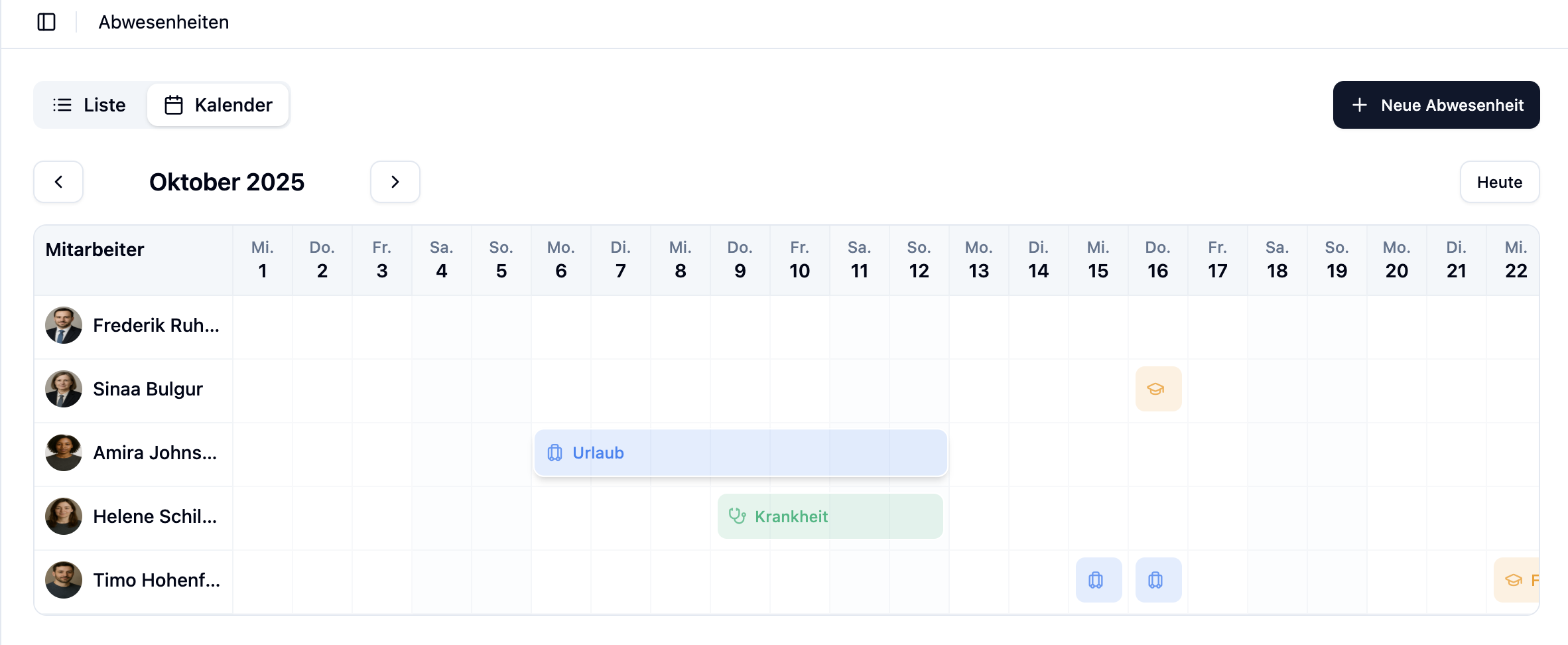 With medishift you plan vacations and absences digitally and talk directly to the Kira assistant. Try it for free!
If you want to understand more deeply how such an assistant works inside the schedule, take a look at our overview of AI duty scheduling and the detailed how-to creating a schedule with AI. To see how vacation planning fits cleanly into the bigger process, visit our vacation planning topic hub.
When someone gets sick: from replacement request to coverage
The honest stress test of any plan is the morning sick call. Someone drops out unexpectedly and you have to find a replacement fast. Here medishift helps you today with an assisted workflow instead of empty promises.
You log the absence – with a click, or by telling Kira the person is sick. Then you start a replacement request for the open shift. The system automatically detects who the shift would create a conflict for (because they're on vacation themselves or already scheduled, for instance) and sorts the available colleagues to the top. So you don't ask around blindly, but target exactly the people who can actually step in. Once someone accepts the shift, the gap is closed.
That's the assisted variant: the AI detects conflicts and sorts availability, while the decision and the final "pickup" stay with a human. It's precisely this human checkpoint that ensures nobody ends up double-booked.
A typical flow looks like this: at 7:15 a.m. a medical assistant calls in sick who was supposed to cover the early shift from 7:00 to 1:00 p.m. You log the sick note, start a replacement request – and immediately see three colleagues at the top who are free that morning and conflict-free. You ask two of them directly, one accepts, the front desk is covered. What used to be ten phone calls and a lot of gut feeling is now a matter of a few minutes – and your head is free for the patients already sitting in the waiting room.
Our next step: we're building Kira to shorten this workflow even further. The idea: when someone calls in sick, Kira proposes suitable replacements on its own – based on availability, work area and the plan – and fills the shift on your click. "You find the replacement" becomes "Kira makes the suggestion, you confirm." That takes most of the work off your hands in the most hectic moment of the day, and it's the direction in which AI vacation planning and absence management at medishift are evolving.
How to get started with AI vacation planning
The good news: you don't have to set up a major project for AI vacation planning. You can start small and expand step by step.
1. Set up master data roughly. Add your employees, their leave entitlements and the work areas. It doesn't have to be perfect from day one – but the more complete this base, the more useful the answers and suggestions you'll get. An AI isn't only useful once every row is maintained; it gets better with each piece of information you add.
2. Maintain absences via the assistant. Get into the habit of dictating vacations and sick notes straight to Kira instead of searching for them. That's the simplest way to manage absences without switching between tabs. After a few days you'll notice how much faster "log this" is than the click path.
3. Query the plan instead of filtering. Use Kira as a reference: "Who's on vacation in week 30?", "Is there enough staff on Friday?". AI absence management answers these in seconds and you stay on top of things without wrestling with tables.
4. Use replacement requests when someone is sick. When a person drops out, take the assisted route via the replacement request. That way you collect exactly the data that the automatic replacement suggestions will later draw on.
With every week that you maintain absences this way, the data base grows – and with it the benefit. Think of digital vacation planning as a tool that grows with your team: the cleaner your vacations, availabilities and work areas are stored, the more accurate the answers become and – as a next step – the replacement suggestions. You don't have to shoulder it all at once; it's enough to consistently work through the assistant in daily life instead of keeping an Excel list on the side.
AI vacation planning today is neither magic nor full automation, but a tangible helper: the assistant creates your absences, answers questions about your plan, and supports you in a sick-day pinch with sorted replacement requests. The next step – Kira proposing replacements itself – is already in the works. The best way to judge it is to try it: test medishift for free and have Kira log your first absence.