How to Create a Shift Schedule: Step-by-Step Guide with Example, Tools and Pitfalls
Create a shift schedule with confidence: preparation, step-by-step guide, tool comparison (paper, Excel, software) and a practical example for medical practices, care services and therapy teams. Includes checklist, employment-law pitfalls and fairness tips.

Table of Contents
You're sitting in front of an empty weekly plan, you have 6 employees, 3 shifts per day, 2 vacation requests, 1 sick note — and the whole thing has to be done by Friday, fair, legally compliant and without double bookings. If that sounds familiar, you're not looking for theory but for a process that works. That's exactly what this article is for. We'll walk through how to create a shift schedule step by step: what you have to know in advance, what the concrete workflow looks like, which tool to use (paper, Excel or software) and where the most common pitfalls hide. By the end you'll have a checklist you can apply on Monday morning.
Key takeaways at a glance
- To create a shift schedule, don't start in Excel — start with three inputs: staffing need per shift, your team's availabilities, and statutory limits (rest periods, weekly maximum hours, breaks).
- Solid shift planning breaks down to five steps: clarify need → define shifts → assign employees → check conflicts → publish and communicate.
- Anyone who wants to build a shift schedule themselves should plan at least 2 weeks of lead time — that matches the German Federal Labour Court's rule of thumb and many collective bargaining agreements.
- Excel is fine for 3–5 employees, becomes a source of errors from 8 employees onwards. Specialised software checks rest periods and double bookings automatically and gives employees access via an app.
- Shift planning is not about "filling gaps" but about making fairness visible: who last worked a weekend, who is on early shift unusually often? That question decides whether the team accepts the plan.
- If you're building a shift schedule yourself in Excel for the first time, budget 4–6 hours including the conflict check — and roughly half that for every following cycle as a routine forms.
How to create a shift schedule: what to clarify before the first entry
Before you enter a single shift, three things have to be clear. Skipping this step means building the schedule on sand — every correction later will eat up twice the time of a clean preparation.
Staffing need per shift
Write down, for every shift on a typical day, which role needs how many people. In a medical practice that might look like this:
- Early shift (7:00 a.m.–1:00 p.m.): 1 medical assistant at reception, 1 in the treatment room, 1 in the lab → 3 people
- Late shift (1:00 p.m.–6:00 p.m.): 1 at reception, 1 in the treatment room → 2 people
- On-call day: additionally 1 medical assistant for standby duty
This table is your target picture. Only once the target is clear can you assess whether your current headcount is enough — or whether you're structurally understaffed and no shift schedule in the world can fix that.
Availabilities, vacation requests, blocked times
For the planning window (typically 4 weeks), collect all absences and requests in one place:
- Approved vacation, training days, known medical appointments
- Recurring blocked times (childcare on Tuesdays after 2 p.m., elder care on Fridays, etc.)
- Part-time staff and their contracted weekdays
If this lives across WhatsApp messages, sticky notes on the fridge and Outlook calendars, you've already lost when creating the shift schedule. Consolidate the data in one place before you start.
Employment-law limits
Three hard limits from the German Working Hours Act (ArbZG) always apply, no matter how tight the schedule:
- 11 hours rest period between two shifts (exceptionally 10)
- Maximum 48 hours per week averaged over 6 months (short-term up to 60 hours)
- Breaks: 30 min from 6 hours of work, 45 min from 9 hours
These rules are not suggestions — a shift schedule that violates them is legally ineffective. Collective bargaining agreements (e.g. the framework agreement for medical assistants) can be stricter, never more lenient. Anyone who wants to build a shift schedule themselves has to know these limits or use a tool that warns automatically.
Step-by-step guide: How to create a shift schedule
When the preparation is done, the actual shift schedule step-by-step guide breaks down into five clear steps.
Step 1: Define shifts and roles
Decide which shift types actually exist: early shift, late shift, split shift, on-call, floater. Each shift type has a fixed time window and a fixed role list (e.g. "Late shift = 1 reception + 1 treatment room"). These shifts become your building blocks — later you only fill them with names.
Step 2: Assign employees — by rotation, not by gut feeling
Place employees into shifts. Three principles help avoid conflict:
- Rotate unpopular shifts (Saturdays, late shifts): everyone takes them equally often
- Wishes first, gaps last: respect blocked times first, then fill the open slots
- Clear floater logic: one employee is the "floater" each week for unplanned absences — that prevents last-minute calls to everyone
Step 3: Check and resolve conflicts
Before you publish, walk through the schedule row by row and check:
- Does everyone have at least 11 hours rest between two shifts?
- Are double bookings ruled out (nobody is in two shifts simultaneously)?
- Are weekly hours per employee within the target — not far over, not far under?
- Is every mandatory role staffed (e.g. "lab" on Wednesday)?
This is the most time-consuming step when you want to build a shift schedule yourself — in Excel you hunt these conflicts with your eye. This is where modern software shows the biggest efficiency gain.
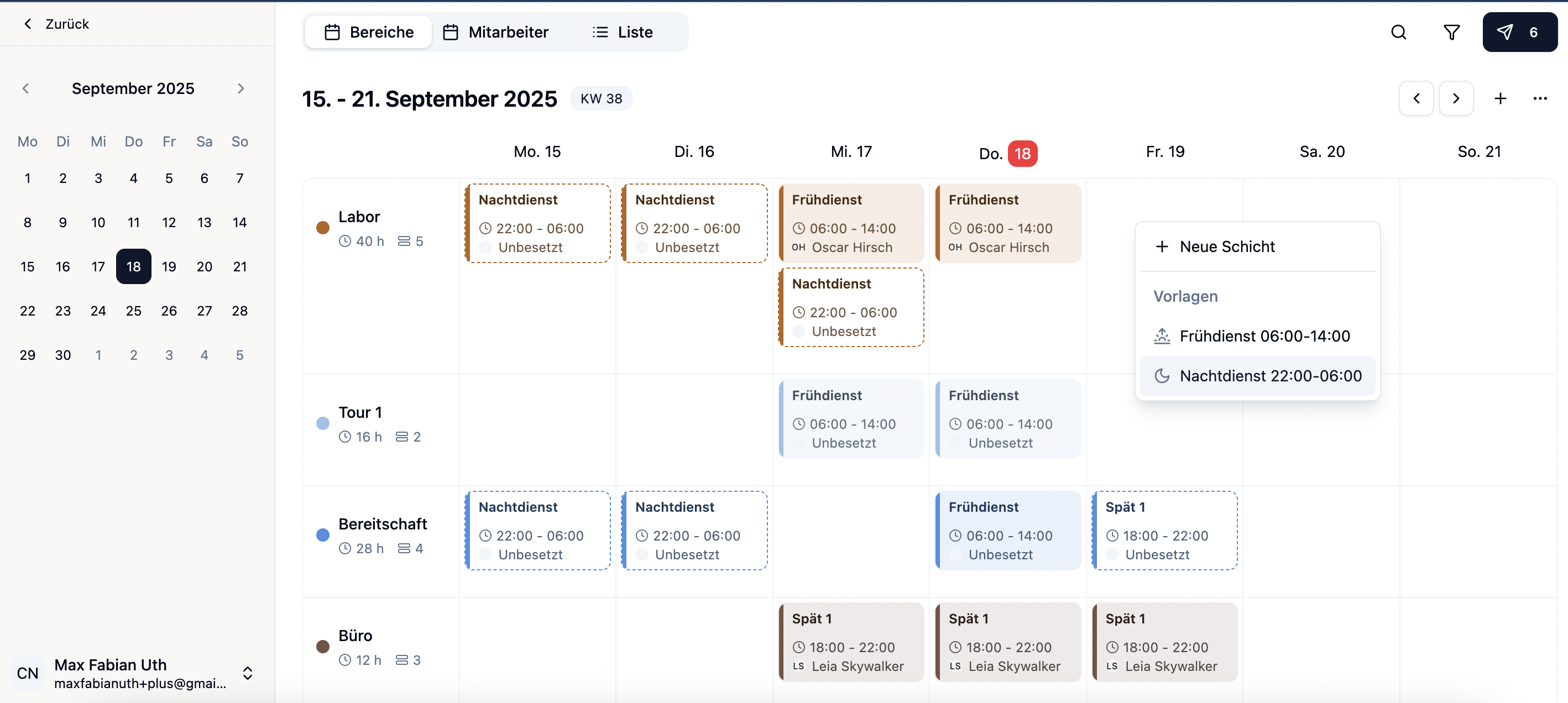 With medishift you build the weekly schedule via drag-and-drop and see conflicts immediately. Try it for free!
How to create a shift schedule that fits the team — tools and acceptance
The question "how to create a shift schedule" is often asked technically. In reality, two dimensions decide whether your plan works: acceptance in the team and the chosen tool. The two are more closely linked than people assume — a tool that makes fairness visible is half the battle for acceptance.
How do you create a shift schedule the team accepts?
Three levers determine acceptance, far more than the tool you choose. When these three points are in place, you'll stop hearing schedule debates in the break room.
Transparency about fairness. Make visible who works Saturdays, late or on-call shifts how often. A simple counter table per quarter takes the wind out of every suspicion. If one person had 12 Saturdays and the next only 4, that's not an occasion for conflict, it's the basis for the next rotation. Whoever tries to create a shift schedule without keeping this statistic in the background runs into every acceptance conflict blind.
Early publication. As soon as you can create the shift schedule, publish it. 2 weeks of notice is mandatory (Federal Labour Court rule of thumb), 4 weeks is golden. A schedule that arrives Friday for Monday demotivates even the best team — and is legally fragile.
Collecting requests in advance. Don't collect shift requests ad hoc via WhatsApp, but in a fixed weekly window (e.g. "Please send requests by Thursday of the previous week"). That way you can compare requests against each other and prioritise fairly — instead of planning on a first-come-first-served basis.
Paper, Excel or software: which tool to use when you build a shift schedule yourself
There are basically three ways to create a shift schedule. Which one fits depends on team size, how often things change, and how many people need to access the plan simultaneously.
Paper or pinboard. Works for mini teams up to 3 people. Pro: maximum overview for those directly involved, no learning curve. Con: no history, no access from home, every sickness means manually rewriting and re-photographing for everyone.
Excel template. The classic for 4–8 employees. Pro: free, customisable, familiar. Con: no automatic check for rest periods or double bookings. Anyone wanting to assemble the schedule themselves checks every rule manually, which is costly and error-prone. Your team has no mobile access either; every change has to go out as a new file, and version chaos is built in.
Specialised shift scheduling software. From around 6–8 employees the switch pays off. A solution like medishift offers:
- Automatic warnings for rest-period violations, double bookings and exceeding weekly target hours
- A mobile app where employees see their schedule at any time
- Vacation and absence tracking that feeds directly into the shift schedule
- An overtime account calculated automatically from published shifts plus absences
- Automatic notifications when the schedule is published or changed
You trade a one-off learning effort for recurring time savings. Anyone planning monthly recovers that effort within two to three planning cycles.
Checklist: 5 items before you publish the plan
Before you hand the finished plan to the team, work through this list — no matter which tool you're using:
- Are all mandatory roles staffed per shift?
- Does everyone have at least 11 hours rest to the previous shift?
- Are weekly hours within the contracted band (not 38h on a 30h contract, not 22h on a 30h contract)?
- Are approved vacations and known blocked times respected?
- Is the rotation of unpopular shifts fair — so no person two Saturdays in a row when others have had months off?
Ticking these five questions before publishing eliminates 90 percent of all later correction requests.
Conclusion: Build a shift schedule without pitfalls
To sum up: when you build a shift schedule yourself, the result is not a question of the tool but of preparation. Anyone who has cleanly documented staffing needs, availabilities and employment-law limits can build the schedule in one hour — whether in Excel or in software. Without that, you sit at it for three hours and send corrections on Sunday. Systematic shift planning saves hours per week and — more importantly — it saves conflict in the team. Good shift planning is half a leadership job: it tells the team that fairness is being tracked, not improvised. The difference between an accepted plan and one the practice keeps wrestling with rarely lies in the details, but almost always in the basics: clear shifts, visible fairness, sufficient notice, and a tool that grows with team size.
When your team has grown and Excel starts to feel cramped, take a calm look at medishift. Drag-and-drop weekly schedule, automatic rule checking, employee app and overtime account in a single tool — built specifically for medical teams. Your next shift schedule could then be done by Thursday instead of Sunday evening.