
Shift Scheduling App: The Complete Guide for 2026
A shift scheduling app replaces Excel sheets with a central, mobile workforce-planning hub. This guide covers what matters, which regulations apply, and how to migrate without disruption.

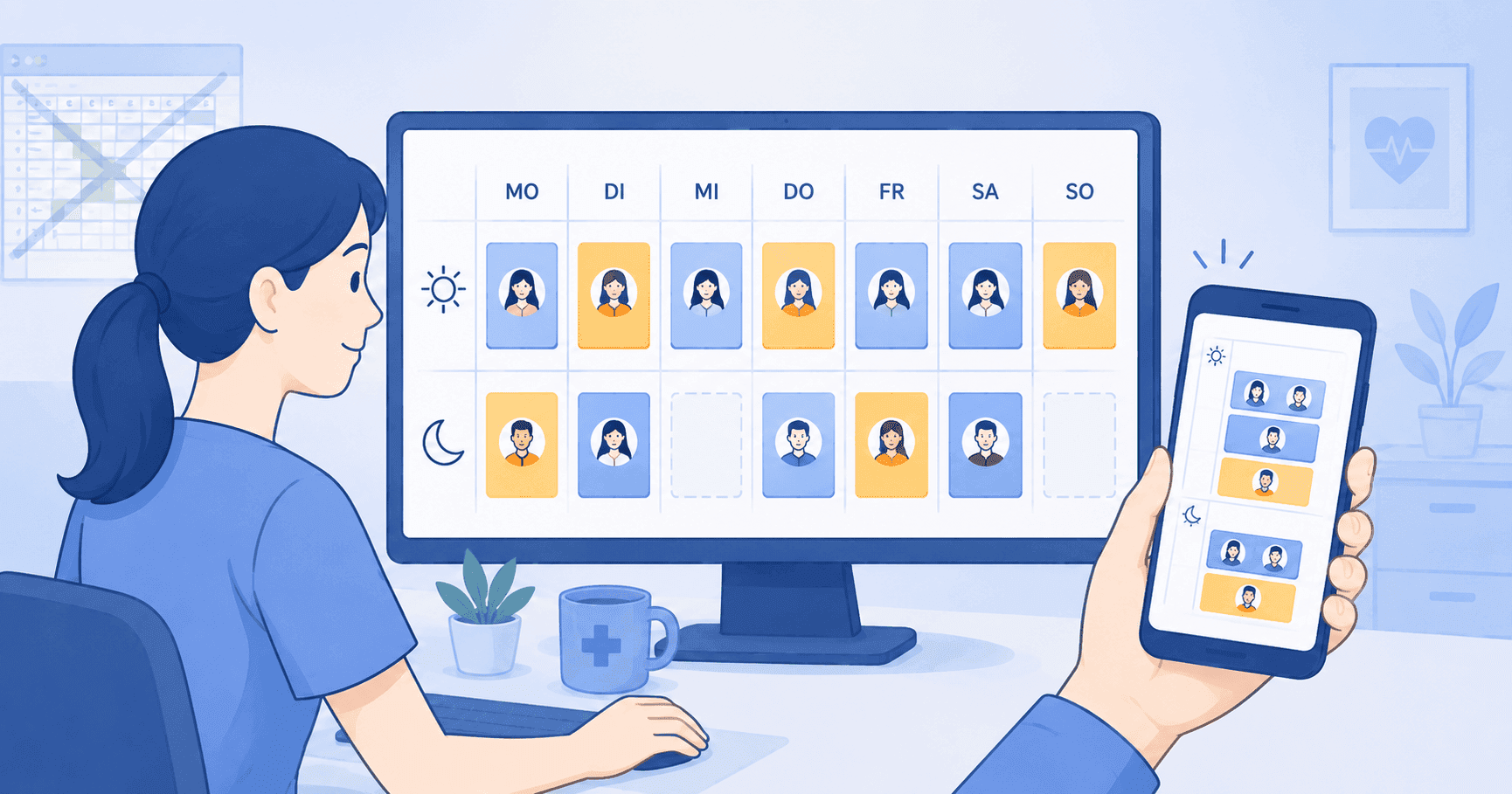
Switching to a shift scheduling app replaces the Excel sheet with a shared, live duty roster that handles your entire shift schedule and personnel planning in one place, including every coverage request and vacation entry. That is precisely where most practices, nursing services, and hospitals find themselves today: Excel still works for a small practice with three medical assistants but breaks down quickly once multiple people, coverage rules, or terms from a collective bargaining agreement come into play.
This guide explains what a modern shift scheduling app needs to deliver, which legal foundations from the Working Hours Act (Arbeitszeitgesetz) and labor agreements you must follow, and how to migrate without friction. We focus on the German healthcare sector because the requirements are tightest here and the available solutions differ the most.
What is a shift scheduling app?
A shift scheduling app is software that does three things at once: it plans shifts centrally, distributes the plan automatically to everyone involved, and documents every change. That sounds simple but is exactly what sets it apart from a classic Excel sheet. In the Excel world every change has to be sent out manually, nobody is sure which version is current, and conflicts such as double bookings or rest-period violations only surface when someone complains.
In a shift scheduling app the duty roster is a living document. When you enter a shift you immediately see whether the rest period is met, whether the person is already scheduled, and whether an approved vacation collides. Employees open the mobile app on their phone and see the current state. Push notifications warn them on changes.
Three core capabilities define a mature shift scheduling app: the rule system, which checks compliance as you enter shifts; the mobile connection, which keeps every staff member informed at all times; and the audit log, which makes every change traceable. Skip any of those three and you end up back at Excel-level value.
The distinction from pure shift templates is important: an Excel template is a static file, a shift scheduling app is a platform. Both have their place. The template helps you get started and works for very small teams. The app pays off as soon as you plan regularly or the team grows beyond a handful of people.
Excel template or shift scheduling app: When the switch makes sense
The question "Excel or shift scheduling app" gets asked too early or too late, rarely at the right time. Too early means the team consists of two people and the plan fits on one sheet of paper. Too late means you have already spent months of Thursday evenings on Excel frustration and team morale is slipping.
The pragmatic indicator is time. If you regularly spend more than two hours a month just on planning and the team produces three or more questions per week on average, Excel has outlived its purpose. Another hard indicator: as soon as you need to organize coverage for sick leaves without half the team ending up on WhatsApp, a shift scheduling app is overdue.
Excel has two advantages that matter in the early phase: zero cost and zero learning curve. Both lose weight as complexity rises. Most vendors today have free tiers for small teams or a full-featured trial. The learning curve for a modern shift scheduling app is well under an hour for the admin role and under ten minutes for employees.
There is a third path that often gets overlooked: parallel use. Some teams keep a simplified Excel template as a long-term cheat sheet or print layout but only plan actively in the app. That works as long as it is clear which system is the source of truth. If both are maintained actively, you introduce consistency problems that are worse than either solution alone.
Which features really matter
A shift scheduling app can offer a hundred features. In a medical practice or nursing service, only six to eight of those decide acceptance and value. Here is the honest list.
Creating and copying shifts. Sounds trivial, but this is the path you walk daily. Drag and drop, applying shifts from templates, copying whole weeks, moving shifts to alternative people. If those basics are clumsy, nothing else matters.
Separating draft and published versions. A good schedule rarely emerges in one pass. You plan, sleep on it, correct, adjust. A shift scheduling app that shows drafts only to admins and publishes only on a deliberate click protects you from confusion in the team.
Rule system for rest periods, double bookings, and maximum working time. The heart of conflict checking. Anyone who tries to enter a shift that violates the Working Hours Act or an internal rule should see it immediately. A warning marker is enough, a hard block can also make sense depending on practice policy.
A genuine mobile app for staff. The biggest acceptance lever. People who can see the plan on their phone stop asking at reception. Equally important: seeing open shifts, requesting swaps or coverage, recording unavailability, viewing the vacation account. Those are the workflows employees expect.
Vacation planning and absence management. Vacation is not an appendage to scheduling, it is part of it. A shift scheduling app should map vacation requests with approval logic, capture sick leave, and let both flow seamlessly into the duty roster. Needing a separate tool for that means double maintenance and stress.
Audit log and versioning. Who changed which shift when? That question surfaces the moment a conflict escalates. A modern shift scheduling app documents every change automatically and makes it visible. That protects you legally and keeps discussions fact-based.
Labor-agreement mapping and holiday calendar. German public holidays must at least be covered, ideally DE, AT, and CH. Anyone working with the collective bargaining agreement for medical assistants benefits from ready-made tariff profiles. If the app has no labor-agreement knowledge, you translate the rules manually, which works but adds effort.
GDPR compliance with European hosting. Non-negotiable. Personal patient data does not appear in a scheduling app, but employee data is sensitive enough. Hosting in the EU, a data-processing agreement, documented technical and organizational measures.
What you will often read in marketing material but rarely use day to day: fully automated optimization powered by artificial intelligence, pre-checked minimum staffing, automatic matching of qualifications. These features are not bad, but rarely the decisive lever in a practice or small nursing service. Pay close attention to whether the vendor describes them as live capabilities or as future vision on the roadmap.
Legal foundations: ArbZG, MTV, and BAG
A shift scheduling app does not relieve you of legal responsibility. It supports you in keeping the rules but the responsibility for a correct schedule stays with you as the employer. Three legal sources frame the picture.
The Working Hours Act (Arbeitszeitgesetz) is the foundation. It states that daily working time must not exceed eight hours but can be extended to ten hours if a six-month rolling average stays at eight. The uninterrupted rest period must be at least eleven hours. Breaks become mandatory once working time exceeds six hours. A shift scheduling app that codifies those rules in its rule system is the basis for legally safe planning.
The collective bargaining agreement (Manteltarifvertrag), for example the one for medical assistants, goes beyond the Working Hours Act and additionally regulates premiums, vacation entitlements, special leave, and termination periods. Practices that are not bound by an agreement can still voluntarily plan along its terms. A shift scheduling app that ships tariff profiles saves substantial configuration effort here.
The Federal Labor Court (Bundesarbeitsgericht) shapes case law on duty-roster disputes. Especially relevant are rulings on how much advance notice is required to change a duty roster, when the employer’s right to give instructions applies unilaterally, and the role of a works council. Practices without a works council should still know the standards of the Federal Labor Court because they serve as benchmarks in individual cases before regular labor courts.
A practical point: a shift scheduling app that documents every change in the audit log gives you valuable evidence in a dispute. Who changed what when, when the plan was published, when a person saw the change. That level of documentation is something no one maintains in Excel.
Mobile app, web app, desktop: where which function belongs
A recurring point of confusion: does shift scheduling app mean only the mobile app? The short answer is no. A mature shift scheduling app typically consists of a web app for the planning and admin role and a mobile app for staff.
This split is intentional. Planning happens on a screen, ideally with an overview of the whole week and several employees at once. Drag and drop, keyboard shortcuts, parallel views. None of that works well on a phone. The mobile app, in contrast, is built for the quick glance: when am I working? Who is on duty with me today? Which open shift could I take?
Medishift follows exactly this split. The web app covers planning, the mobile app covers employee workflows. That is not a limitation but a design choice: anyone trying to plan as an admin on a smartphone is likely building error sources that get expensive on a weekly cadence.
So when evaluating a shift scheduling app, test both sides. The web app for planning fitness, the mobile app for quick information on the go. If both work, the architecture is coherent.
Rollout: what happens in the first quarter
Rolling out a shift scheduling app is not an IT project in the classical sense. It is a change in the daily workflow of the whole team. Anyone underestimating that gets Excel back faster than they would like.
Week one is configuration: assign roles, enter labor rules, define shift types, check the holiday calendar. That work pays off because it simplifies every subsequent plan. Block half a day of focused time, ideally on a quiet day.
Weeks two and three you plan in parallel: once in the new shift scheduling app, once in your familiar Excel sheet. It is awkward, but it gives you a safety net in case something does not match. You also learn where Excel workflows are solved differently in the app.
From week four you turn off Excel and plan only in the app. Now the configuration shows whether it holds. Keep deliberate time free for small adjustments, especially when the team gives feedback on the mobile app or new shift types are needed.
In months two and three you build routine. Weekly planning shrinks because templates emerge and the team raises swap requests through the app. This is where the real value shows: less time on administration, more time on patient care or other priorities.
A practical tip: keep a short list during the first quarter of what works well and what still stings. That list is gold during conversations with the vendor. Most good vendors are highly interested in concrete feedback and act on it.
Common pitfalls and how to avoid them
Even with careful selection, recurring pitfalls cost money. Four of them stand out.
The mobile app does not get installed. When half the team has not installed the app, information flows back through hallway chatter, messages, and calls. Solution: launch the installation together in a team meeting. Anyone uncertain technically gets help on the spot. Within two weeks the app should be running on every phone.
The rule system gets ignored. Warnings from the rule system get clicked away because "today an exception is needed". When that becomes the norm, conflict checking loses its bite. Solution: a clear team agreement that exceptions are justified and documented. A tool that requires a comment when overriding rules helps here.
The configuration becomes outdated. Shift types, labor-agreement clauses, and locations change. If nobody maintains them, the tool starts lying. Solution: a quarterly ten-minute routine to check the configuration against current reality. That usually suffices.
No clear owner for the tool. If nobody is responsible, no one decides whether to enable new features or adjust settings. Solution: one person on the team gets the "tool owner" role. In small practices that is often the practice manager, in larger structures the nursing-service lead.
What matters after three months
Once the rollout has succeeded, the mature phase begins. The point is no longer to replace Excel but to extract full value from the new solution. Four topics become relevant.
Building templates. Most weeks resemble each other. Teams that set up templates for typical weeks plan in five minutes instead of fifty. A good template system lets you copy entire weeks, mark single shifts as recurring, and adapt templates per season, for example for school holidays or peak working periods. This is the lever that delivers the largest time savings.
Reporting and analysis. Anyone who manages the duty roster regularly will eventually want to know: how many overtime hours have accumulated? How does weekend duty distribute across the team? How often did a shift need to be changed within 48 hours? A mature solution answers those questions with built-in reports or an Excel export.
Integration with other tools. In the second half-year after rollout, the wish for integrations often arises. To payroll, to the practice management system, to a calendar. Not every vendor offers those integrations. Clean import interfaces for employee data and an export of planned hours are the minimum.
Maintaining the vendor relationship. A good solution keeps evolving. Anyone staying in dialog with the vendor, testing new features, and feeding back gets a tailored experience. With specialized healthcare vendors that often means direct contact with the product team, not an anonymous support queue.
Vendors in the German market
The German market for scheduling solutions is smaller than the international market but lively. Some vendors focus deliberately on medical practices and small nursing services, others target hospitals or general shift-based teams across industries.
Medishift sits at the intersection of practice requirements and a mature mobile experience. The web app covers planning, the mobile app is built for staff, hosting runs in Germany, GDPR compliance is documented. Practices with up to ten employees have a free tier, larger teams pay per head.
Other established German-market vendors target hospitals or industry-agnostic teams, or pure nursing services with route planning. The right choice depends on how close your use case sits to a medical practice. The more specifically a vendor is built for your sector, the less configuration work you carry.
When evaluating, focus on four hard criteria: hosting in Germany or at least in the EU, a German-language interface, a real mobile app for staff, and a rule system that codifies the key requirements of the Working Hours Act. Anyone covering those four points is a serious option. Everything else is fine-tuning.
An additional filter practices often underestimate is German-speaking support. When you need help on Thursday evening just before publishing the plan, you do not want an English-language chatbot loop. Vendors with real German-speaking support by email or phone, ideally with sector knowledge, win on this dimension. That is not a luxury, it is a baseline for smooth operations.
Security, backups, and outages
A point that rarely tops the evaluation list: what happens if the tool is unreachable for once? In the Excel world the plan sits locally on a computer, making it vulnerable to hardware defects but independent of the internet. A cloud solution flips that around: hardware problems are irrelevant but a stable connection is required.
Reputable vendors offer an availability guarantee of 99.5 percent or better, perform regular backups to separate servers, and communicate transparently when an incident occurs. Ask explicitly during the sales conversation: where are backups stored? How quickly would the data be restored after a crash? Is there a status dashboard?
For day-to-day operation, a contingency plan is sensible: print the published plan once a week or download it as a PDF. That is the simplest insurance against rare but expensive outages and takes under ten seconds a week. A second safety layer is exporting master data: anyone exporting employee master data as CSV regularly has no lock-in when switching vendors. Serious solutions support that export without an upcharge because they understand that trust grows from transparency rather than from artificial migration hurdles. Ask about it explicitly when signing the contract and test the export once during the trial. If it does not work or is overly complex, treat it as a warning sign.
Summary
A shift scheduling app is no longer a nice-to-have but, for most practices and nursing services with a team of about five people or more, the obvious choice. Excel templates have their place at the starting line but break down quickly once coverage rules, labor agreements, and mobile access enter the picture.
The most important capabilities are a clear rule system, the separation between draft and published versions, a real mobile connection for staff, and an audit log that documents every change. Legally these features do not exempt you from responsibility but they help you stay compliant with the Working Hours Act, the collective bargaining agreement, and the case law of the Federal Labor Court in day-to-day operations.
The rollout pays off if you plan the first four weeks in parallel with Excel, involve the team early, and assign clear responsibility for the tool in your organization. Three months after the start the routine should be in place, and you gain several hours per week that you can deploy more meaningfully, whether in patient care or in the strategic development of the practice.
Comparison
| Aspect | Excel template | Shift scheduling app |
|---|---|---|
| Update visibility | After manual distribution | Instant, real time |
| Conflict checking (rest, double booking) | No, only visual review | Automatic on entry |
| Mobile access | Via email attachment or print | Dedicated employee app |
| Shift swaps and coverage | Manual messages | In-app with approval logic |
| Vacation requests | Separate Excel list | Same system, flows into plan |
| Change documentation | Version files, fragile | Automatic audit log |
| Scaling beyond 10 staff | Becomes unwieldy | Designed for larger teams |
| GDPR documentation | On you, no support | Documented by vendor |
How to do it
- 1
Identify the actual pain in your practice
Before comparing tools, write down what really hurts: How many hours per month do you currently spend on scheduling? How often do questions or conflicts come up? Which labor-agreement rules and shift types must be reflected? These answers form your requirement profile and determine which features really count.
- 2
Test two or three vendors in parallel
Choose tools that offer a real trial period and create a typical week with each one: consultation hours, coverage, a vacation request, and a shift swap. You will notice very quickly which tool fits your day-to-day. Avoid being impressed by feature lists you will never use.
- 3
Involve the team early
A shift scheduling app only works if everyone uses it. Invite one or two team members into the trial and actively collect feedback. How well does the mobile app work on the move? Are push notifications clear? Buy-in from the start decides whether the new tool will be embraced or relegated to a shadow solution next to Excel.
- 4
Configure labor rules and shift types cleanly
Before the first real plan goes live, the basics need to be right: break rules, rest periods, maximum hours per week, weekend and holiday logic. If you want to reflect the collective bargaining agreement for medical assistants, translate its core rules into the tool’s rule system. That way you catch violations on entry.
- 5
Run the first four weeks in parallel with Excel
Plan the first full month in both systems as a safety net: once in the new app, once in your familiar Excel sheet. That gives you a benchmark in case something is off and reduces the risk of the switch. After four weeks, turn off Excel and plan exclusively in the app.
- 6
Prepare onboarding material for new hires
Once the tool is running, a single-page handout for new team members pays off: how to install the app, where to find their shifts, how to request time off. That way the shift scheduling app becomes part of standard onboarding and you no longer have to explain it from scratch every time.
For your practice
For medical practices
In a medical practice, the requirements for a shift scheduling app are manageable but very specific. Consultation hours, coverage rules, the collective bargaining agreement for medical assistants, and the clean separation between the practice owner and the MFA team shape the day. The essentials are a simple rule system that checks breaks and rest periods, a mobile app for staff, and a German-language interface. A vacation logic that supports blackout periods such as school holidays is a bonus.
For nursing services and hospitals
In nursing services and hospitals, a shift scheduling app grows more complex. Shift patterns with early, late, and night shifts, on-call duty, standby duty, multiple locations, and partly collectively bargained working hours are part of daily life. A suitable shift scheduling app supports those shift types, faithfully reflects the German Working Hours Act, and lets you model multiple wards or routes. If you run an ambulatory nursing service, also check how shift planning and route planning interact.
Frequently asked questions
Related articles
Practice Scheduling: Shift Planning Guide
Learn how to optimize scheduling in your medical practice. Practical tips for workforce planning, shift scheduling, and improving employee satisfaction.
AI Scheduling for Medical Practices: Guide 2026
AI schedule creation - Discover modern scheduling with AI for medical practices. Create shift schedules with AI and revolutionize personnel planning.
Shift Models: 2, 3, 4 and 5-Shift Systems
All common shift models clearly explained: from 2-shift models to 4-shift continuous operation models. With practical examples and templates for medical practices.
Employee Scheduling Rights: Guide 2026
Learn everything about your scheduling rights as an employee: When must a schedule be ready, labor law regulations, and notification deadlines 2026.
Sources
This content references the following public sources:
- [1]Working Hours Act (Arbeitszeitgesetz / ArbZG) — Federal Ministry of Justice (Germany) (2024-01-01)
Full text of the German Working Hours Act, including maximum working time, rest periods, and break regulations.
- [2]Federal Holiday Act (Bundesurlaubsgesetz / BUrlG) — Federal Ministry of Justice (Germany) (2024-01-01)
Rules on minimum vacation entitlement, carry-over, and fulfilment of the leave claim.
- [3]Decisions of the Federal Labor Court — Federal Labor Court (Bundesarbeitsgericht) (2024-03-15)
Searchable decision archive of the German Federal Labor Court on employment-law matters, including working time, the employer right to direct, and changes to duty rosters.
- [4]Working time and working-time protection — Federal Ministry of Labour and Social Affairs (BMAS) (2024-06-01)
Government overview of working-time regulations and protective provisions.
- [5]Praxisführung (practice management) — National Association of Statutory Health Insurance Physicians (KBV) (2025-01-01)
KBV overview page on practice management, covering practice organization, delegation, and staffing in statutory outpatient care.
- [6]Labor market: Employment in healthcare — Federal Statistical Office (Destatis) (2025-06-01)
Statistics on employment trends in the German healthcare sector.