
Shift Schedule Template: The Complete Guide for 2026
A shift schedule template brings structure to shift planning. This guide shows which template fits when, what the law requires, and when scheduling software is worth it.

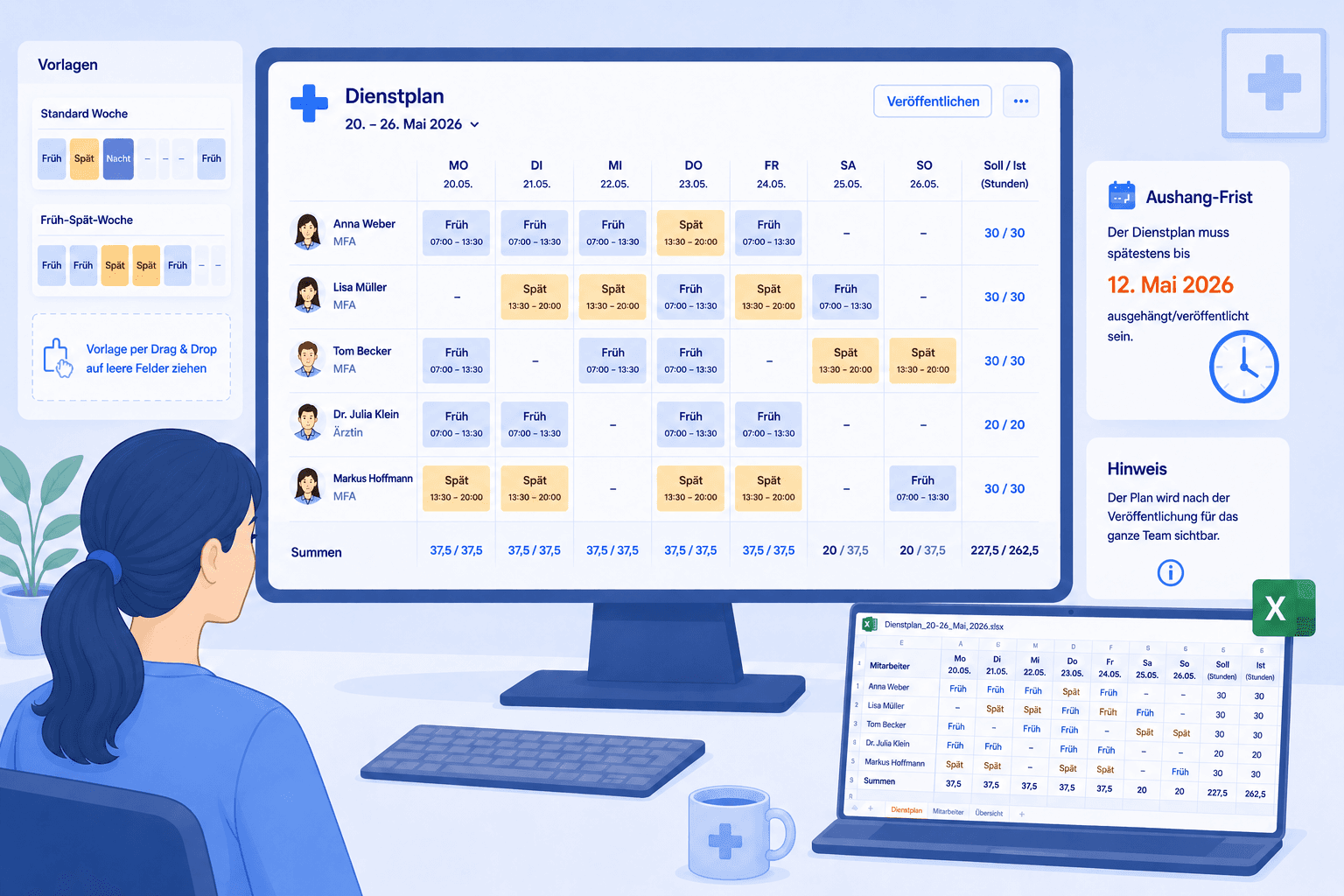
A good shift schedule template — in German a Schichtplan Vorlage — is the fastest way from a blank Excel spreadsheet to a finished duty roster your team can actually work from. It gives the week a structure, makes shifts and areas visible, and takes the same repetitive formatting work off your plate. If you just want a file to start from, a free Excel template like our shift schedule template for download is the quickest entry point; this guide then shows you what a usable template must contain, which models it can represent, what legal limits apply, and from what point the move from a spreadsheet to shift-planning software is worth it.
We focus on the German healthcare sector because the requirements here are especially tight: small teams, almost no buffer when someone is out, and round-the-clock operation in care and clinics. Much of this transfers to any team that works in shifts. The examples come from medical practices, care services, and hospitals, but the principles apply just as well to any organisation where several people have to coordinate their working times.
What is a shift schedule template?
A shift schedule template is a prepared grid that captures the recurring structure of a shift plan, so that you only enter names and times instead of starting from scratch every week. In the simplest case this is an Excel or Word file with rows for staff, columns for weekdays, and fields for each shift. At its core, a good template answers three questions: who works when, in which area, and how many hours that adds up to?
The difference between a good and a bad template rarely lies in how it looks, but in its calculation logic. A template that stores shift times only as text looks tidy but does nothing for your hours balance. A template that holds start and end times as real time values, subtracts breaks, and builds a total row per person shows you overtime immediately. It is precisely this quiet calculation work that separates a real shift schedule template from a pretty weekly grid.
It is also important to distinguish planning from a mere attendance list. Anyone who only documents who is present is not yet planning. Planning means steering ahead: distributing shifts so that every area is staffed, the rest periods are honoured, and the load is fairly shared. A template supports this but does not replace the management decision about who is scheduled at the weekend or at night.
For very small teams, a lean shift schedule template in Excel often lasts surprisingly long. But as soon as several shifts, changing areas, statutory rest periods, and constant changes come together, manual upkeep becomes fragile. That is exactly when the practical file turns into a genuine planning challenge that calls for a better tool.
Excel template or software: when the switch makes sense
The question "Excel or software" is rarely asked at the right time. It is too early when the team is three people and the plan fits on one page. It is too late when someone has already been double-booked twice, or a night shift went unstaffed because nobody knew which version of the file was current.
The most reliable sign is how much manual work the template now eats up. If you regularly recalculate hours by hand at month-end, if changes arrive by call, chat, and sticky note, and if nobody can say with certainty which Excel version is valid, then the plain spreadsheet has outlived its usefulness. A second hard indicator is visibility: as soon as staff cannot see their own plan themselves, every question lands back with management.
Two things speak for the table at the start: it costs nothing, and no one has to learn anything new. Both arguments grow lighter the more tangled the plan becomes. Shift-planning software checks conflicts as you enter them, updates the hours balance automatically, and makes the plan visible to everyone at the same time. The comparison below shows where the spreadsheet reaches its limits and what a system does differently.
There is a third, often overlooked path: parallel use. Some teams keep a lean shift schedule template as a print layout or noticeboard but actively plan only in the software. That is legitimate, as long as it is clear which system is the source of truth. Once both are actively maintained, you invite consistency problems that are worse than either solution on its own.
Which shift schedule template fits which team
Not every template suits every organisation. A family practice with fixed consulting hours needs a different grid than an outpatient care service with rounds, or a hospital ward in a three-shift model. So before you download any file, it is worth asking what structure your everyday work really demands.
For the medical practice, a weekly template with clearly separated early and late duties is usually ideal. The columns for work areas such as reception, lab, and treatment room are decisive, so you can see at a glance whether each area is staffed. A month-based shift schedule template is often too coarse here, because consulting hours change at short notice.
For the care service and hospital, you need a grid that separates night, early, and late shifts cleanly and makes the handovers visible. What matters most here is that the rest period between two shifts stays recognisable and that demanding duties are distributed fairly. A pure weekly template often does not suffice, because rotating models have to be planned across several weeks.
For small businesses outside healthcare, a simple shift schedule template with names, days, and shift codes is often enough. The only thing that matters is that the hours calculation is correct and that the template stays extensible as the team grows. Anyone who chooses a well-thought-out structure from the start does not have to rebuild everything later.
How to approach shift planning
A shift plan that carries the whole week does not appear spontaneously on Monday morning but follows a recurring process. The steps below have proven themselves in many organisations and can be implemented regardless of the tool you use, whether in Excel or in software.
The order is decisive: first the building blocks, that is shifts and areas, then availability, then assignment, and only after that publication. Anyone who reverses this order and distributes shifts before it is clear who can even work is forced to walk back assignments, which goes down badly with the team. Plan the rough frame once and then adjust it only in individual cases.
In practice a fixed rhythm helps: you create the plan for a clearly defined period, say four weeks ahead, and then publish it bindingly. Until publication you collect wishes and availability; after that, only justified individual changes apply. With this rhythm everyone knows early where they stand, and you do not have to start from scratch every week. The four steps above summarise the cycle that a working shift planning process runs through again and again.
Legal foundations: Working Hours Act, rest periods, and documentation
Shift planning operates within a clear legal framework, shaped above all by the Working Hours Act. Anyone who knows it plans not only more fairly but also more safely, because violations can be costly and endanger the health of staff.
The Working Hours Act sets the most important limits. Daily working time may in principle not exceed eight hours and can only be extended to up to ten hours under compensation conditions [1]. After the end of the daily working time, an uninterrupted rest period of at least eleven hours must be observed [1]. For hospitals and care facilities the act permits narrowly limited deviations, such as a shortening of the rest period, which must however be compensated. You should keep these limits in mind as you enter a shift, not check them only at month-end.
For night and shift work, additional protective rules apply. The act requires that the work be designed in a human-centred way according to established ergonomic findings [1]. The Federal Institute for Occupational Safety and Health recommends, among other things, a forward rotation of shifts and as few consecutive night duties as possible [3]. These recommendations are not rigid rules but help to reduce strain and absences. In addition, the Occupational Safety and Health Act governs the employer's general duties on risk assessment [2].
On the documentation of working time, the legal situation is in motion. Employers are obliged to provide a system for recording the hours worked. For shift planning this means: the plan and the hours actually worked must remain traceable. The Federal Ministry of Labour and Social Affairs offers a good overview of the applicable protective rules [4]. Anyone who wants to gauge the strain in their own team will find data on working time in healthcare at the Federal Statistical Office [5].
Representing shift models correctly in the template
A shift schedule template is only as good as the model it can represent. The most common model in healthcare is the split into early, late, and possibly night shifts. Defining these three blocks cleanly, with a fixed start and end time and a deducted break, already solves most everyday problems.
In the two-shift model, early and late duties alternate, typical for practices with long opening hours and no night operation. Here the template mainly needs a clear marking of who works early and who works late, plus logic that prevents someone from taking both duties on the same day. The three-shift model adds the night and is standard in clinics and inpatient care. Here the rest period becomes the central quantity, because the transition from night to early shift quickly breaches the eleven hours.
Rotating models, in which the team moves through the shifts in fixed groups, can in principle be represented in Excel but quickly become hard to read. As soon as groups, wishes, and absences overlap, the spreadsheet reaches its limits. Software represents such patterns through week templates that you apply to any period, instead of copying every rotation by hand. That keeps the model consistent even when everyday life interferes.
From template to a running system: the rollout
The switch from a shift schedule template to software rarely fails on technology but on the rollout. Anyone who tries to move the whole team in a single day creates resistance. A calm, step-by-step transition that does not ban the old file overnight has proven its worth.
A good first step is to carry the existing structure into the new system one to one: the same areas, the same shift times, the same names. That way everyone recognises their familiar plan and does not have to get used to new processes and a new tool at the same time. Only once the basic scaffold stands is it worth using additional functions step by step, such as reusable week templates or automatic conflict checking.
It is important to decide early which system is binding. As long as Excel and software are maintained in parallel, contradictory states arise that undermine trust in the new tool. Set a clear date from which planning happens only in the system, and communicate it openly. Also plan a short onboarding for the people who plan themselves. For management this usually takes barely an hour; the rest follows in practice.
Common pitfalls with shift schedule templates
Most problems with shift plans are not spectacular but creep in through small lapses. Anyone who knows them avoids them easily.
The most common trap is the outdated version. As soon as an Excel file is sent by email, it exists in several states at once. Someone plans in an old copy, a shift gets lost, and in the end the team argues about which plan is valid. A central source visible to everyone solves this problem at its root. The second trap is the silent rest-period violation: the transition from late to early shift looks harmless but falls below the eleven hours. In the spreadsheet nobody notices, a system warns as you enter.
A third pitfall is the missing hours balance. Anyone who plans shifts without keeping the per-person total in view discovers overtime only once it has become a problem. The fourth trap is the unfair distribution of weekend and night duties. Without a documented rule, an impression of arbitrariness quickly arises, even where none is intended. Put the distribution logic in writing, then every decision is traceable. The fifth trap, finally, is too short-notice planning: publishing the plan only a few days ahead robs the team of any chance to organise their private lives.
Connecting a shift schedule template with hours tracking
A shift plan does not end with assigning the shifts. At the latest by month-end the question arises of how many hours each person actually worked and how that compares with the agreed target. This is exactly where a good shift schedule template separates itself from a mere weekly overview: it carries the planned hours in a way that yields a reliable balance, instead of only showing who is entered.
In Excel you solve this with formulas that derive the shift duration from start and end time, subtract the break, and sum per person. That works as long as the file is maintained cleanly and nobody accidentally overwrites a formula. With every manual change, however, the risk grows that the totals no longer add up. Keeping a separate hours record alongside, such as a paper timesheet, doubles the work and the sources of error.
The clean path is to bring planning and the hours balance together in one place. In software the balance follows directly from the published shifts: planned hours against target, carried forward with every change. If a shift drops out or one is added, the balance updates automatically. That way you see overtime as it arises, not only once it has piled up over weeks. The distinction matters: this is the balance from the plan, not a punch clock. Anyone who needs to record actual clock-in and clock-out combines the planning with a system specialised for that.
For most practices and small teams, however, the planned hours balance from the shift schedule template or the software is entirely sufficient. It reliably answers the decisive question: is someone consistently working above or below the agreed amount? Anyone who can answer that early can steer against it before a small imbalance turns into a real problem with overtime and dissatisfaction.
Printing, posting, and sharing a shift schedule template
However digital the planning becomes, the printed plan on the noticeboard has not had its day. Many teams value a clearly legible posting that everyone glances at in passing, without first reaching for a device. A usable shift schedule template therefore delivers not only the planning view but also a clean print layout that fits on one page and makes the key information recognisable without a magnifying glass.
You should be honest, though, about what a printed plan can and cannot do. A printout is always only a snapshot: the moment someone calls in sick, a shift is swapped, or extra cover is ordered at short notice, the version on the board is already out of date — and nothing about the paper reveals that it no longer holds. This is exactly where the printout becomes error-prone. Anyone relying on the posting is, in case of doubt, working from yesterday's state. Once handwritten corrections are added, the plan quickly turns confusing: names crossed out, arrows to the margin, notes only the person who wrote them understands. A paper plan structurally cannot reflect short-notice changes, because there is no way to inform everyone involved reliably and simultaneously about the new situation. The posting is therefore a good overview, but not a dependable source for the current staffing at any given moment.
If the posting is to serve its purpose despite these limits, reduction counts most when printing. A posting does not need to show every note and every hours value, but above all who works when and in which area. Too many columns make the printout unreadable. It has proven worthwhile to choose a simplified view for the posting and reserve the depth of detail for the digital version. And because a paper plan loses touch quickly anyway, a clearly visible date belongs on it: that way everyone can tell at a glance how fresh the state in front of them actually is.
When sharing, the question of the source of truth is decisive. This is exactly where the two truths described above arise: as soon as changes are added by hand on the paper but not transferred into the system, the team ends up relying on the wrong one. So establish that changes always happen first in the digital plan and the posting is only updated afterwards.
Software makes this path easier, because it outputs the week as a PDF at the press of a button, adapting to the respective view. That keeps the posting current without anyone rebuilding it by hand. Anyone who additionally relies on a mobile app for staff also reaches those who rarely pass the noticeboard, and noticeably reduces the number of follow-up questions.
Tools and providers in the German market
Anyone who wants to go beyond the plain Excel template will find a range of solutions for shift planning in the German market, from lean online plans to comprehensive personnel-management systems. The choice should not be guided by the largest feature set but by what your everyday work really needs. For a small practice team an overloaded enterprise tool is as unsuitable as an overly simple app for a hospital ward.
Important selection criteria are conflict checking as you enter, an automatic hours balance, visibility for staff, and data protection to German standards. Look for hosting within the EU, a data-processing agreement, and a German-speaking contact. A solution that brings shift and week templates saves you the same repetitive typing, because you transfer proven patterns to new weeks instead of copying them.
Medishift is one of these solutions, built specifically for medical practices, care services, and clinics. The software offers reusable shift and week templates, a configurable rule system that warns when assigning about double-booking and too-short rest, and an automatic overtime account that updates the balance from published shifts. With bulk publishing you release the whole week with one click, and staff see their plan in the dashboard and the mobile app. The Kira AI assistant creates shifts on request or applies a template when you phrase it in the chat. Which solution fits in the end is best decided in a trial phase with real data from your own team.
Summary
A shift schedule template is the ideal entry point into orderly shift planning: it gives the week structure, makes areas visible, and takes routine work off your hands. What matters is not the look but the calculation logic behind it, and whether the template represents rest periods, the hours balance, and models such as two- or three-shift cleanly. As long as the team is small and the plan fits on one page, a good Excel template suffices for a long time.
But as soon as several shifts, statutory rest periods, constant changes, and visibility for the team come together, the move to software that checks conflicts as you enter and updates hours automatically pays off. Anyone who approaches the switch calmly and step by step, observes the legal limits from the Working Hours Act, and documents distribution rules openly will in the end plan more fairly, more safely, and with considerably less effort.
Comparison
| Aspect | Excel template | Shift-planning software |
|---|---|---|
| Conflict checking | Manual visual inspection | Warning on double-booking and too-short rest |
| Hours balance | Manual formulas, error-prone | Overtime account updates automatically |
| Publishing | Send or print the file | One click publishes the week to everyone |
| Reusing templates | Copy and adjust the table | Apply shift and week templates to any week |
| Visibility for the team | Everyone needs the current file | Own plan in the dashboard and mobile app |
| Changes | New version, risk of duplicates | Drag and drop, everyone sees the state at once |
How to do it
- 1
Define shifts and areas
Before you enter the first name, set the building blocks: which shifts exist, such as early, late, and night, and which work areas must be staffed. This structure is the scaffold of any shift schedule template and decides how clear the resulting plan will be.
- 2
Capture target hours and availability
Enter each person's agreed weekly hours and fixed availability. Whoever can only work mornings or cannot work certain days belongs here. These details are the basis for keeping the plan realistic so that nobody is scheduled beyond the agreed amount.
- 3
Assign shifts and check conflicts
Now you distribute the shifts across the team. When assigning, watch the statutory rest period, double-bookings, and absences already entered. In Excel you check this by hand; software warns you automatically as soon as an assignment breaks a rule.
- 4
Publish the plan and update hours
Once the plan stands, make it visible to everyone and ensure every change reaches the team immediately. In parallel the hours balance runs along: planned shift hours against target give the running balance, which you no longer have to recalculate at month-end.
For your practice
For medical practices
In a medical practice the workforce is small and tightly scheduled. If one assistant is out, the gap is felt immediately at reception or in the treatment room. A shift schedule template here helps above all to staff consulting hours and areas cleanly and to keep overtime in view. Clear early and late duties, a reliable cover arrangement, and a view in which practice management sees at a glance who works when all matter. As soon as several treatment rooms and changing opening hours come together, the move from spreadsheet to a system pays off.
For care services and hospitals
In care services and hospitals the operation runs around the clock, often in a three-shift model with night and weekend duties. Here clean shift planning is not a comfort but a precondition for care delivery. Rest periods, maximum consecutive working days, and a fair distribution of demanding duties must be reliably observed. A template alone soon hits its limits, because shifts, absences, and collective-agreement rules overlap. A system that warns as you enter and represents multiple locations removes a lot of risk for management here.
Frequently asked questions
Related articles
Shift Models: 2, 3, 4 and 5-Shift Systems
All common shift models clearly explained: from 2-shift models to 4-shift continuous operation models. With practical examples and templates for medical practices.
How to Create a Shift Schedule: Step-by-Step Guide with Example, Tools and Pitfalls
Create a shift schedule with confidence: preparation, step-by-step guide, tool comparison (paper, Excel, software) and a practical example for medical practices, care services and therapy teams. Includes checklist, employment-law pitfalls and fairness tips.
Sources
This content references the following public sources:
- [1]Working Hours Act (ArbZG) — Federal Ministry of Justice (2024-01-01)
Full text of the German Working Hours Act with rules on maximum daily working time, breaks, and the minimum rest period of eleven hours.
- [2]Occupational Safety and Health Act (ArbSchG) — Federal Ministry of Justice (2024-01-01)
Foundations of workplace health and safety that must be considered when designing shift and night work.
- [3]Night and Shift Work — Federal Institute for Occupational Safety and Health (2025-01-01)
BAuA recommendations on the human-centred design of shift and night work, such as forward rotation and shift length.
- [4]Working-time protection: BMAS overview — Federal Ministry of Labour and Social Affairs (2024-06-01)
BMAS overview page on maximum working hours, rest periods, and the protective rules for shift and night work.
- [5]Labour market: people employed in healthcare — Federal Statistical Office (2025-06-01)
Federal Statistical Office data on employment and working time in the German healthcare sector.