
Workforce Planning: The Complete Guide for 2026
Workforce planning brings need, availability, and deployment into balance. This guide covers methods, the limits of Excel, the legal rules, and the move to software.

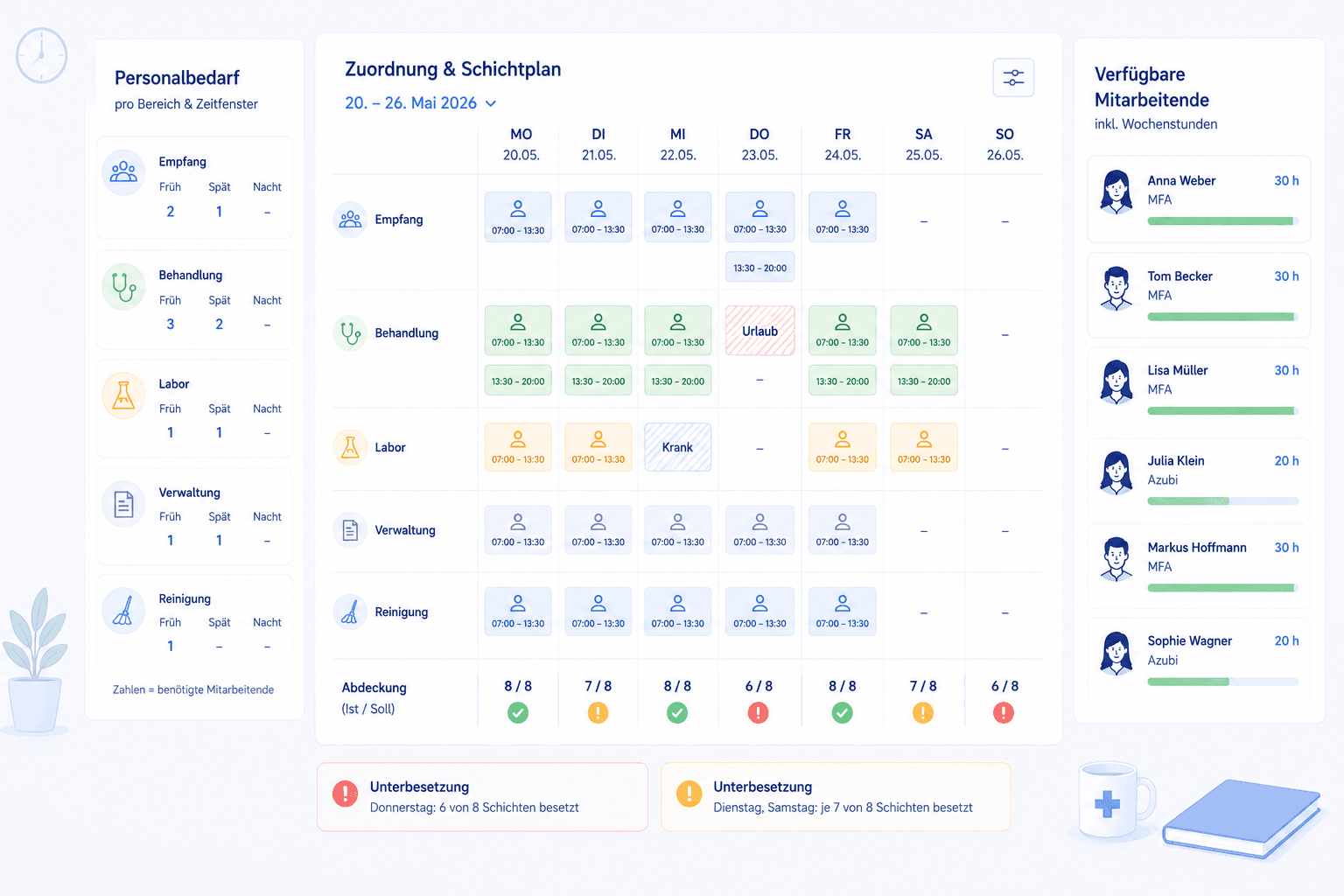
Anyone responsible for workforce planning in a medical practice or a small business brings three things into balance every day: the need per area, the availability of staff, and a duty roster that ends up in Excel or in software. Workforce planning is precisely the discipline that turns these quantities into reliable coverage, without blowing the budget or overloading the team. This guide shows you what workforce planning covers, how it differs from staff deployment planning, which legal limits apply, and from what point the move from a spreadsheet to a system is worth it.
We focus on the German healthcare sector because the requirements here are especially tight: small teams, almost no buffer when someone is out, and a high demand for reliability towards patients. The principles apply, though, to any organisation in which several people work at changing times and their deployment has to be coordinated.
What is workforce planning?
Workforce planning is the process by which an organisation determines its staffing need and deploys the available people so that every task is covered at the right time. It links two levels: the forward-looking question of how much staff is needed over weeks and months, and the operational question of who takes which shift tomorrow. Only both together make a plan that holds up in everyday work.
At its core, good workforce planning answers three questions at all times: is the need per area realistically defined? Are the available hours known and current? And do need and coverage match in every time window? As long as these three questions are reliably answered, the planning runs smoothly. If one of them wobbles, either costly overstaffing or dangerous gaps arise that overload the team and endanger care.
It is important to distinguish this from mere roster creation. Anyone who only enters who works when is not yet doing workforce planning. Planning means looking ahead: knowing the need, spotting bottlenecks early, and deliberately distributing the available working time instead of merely administering it. This forward-looking view distinguishes workforce planning from the bare creation of a plan.
For a very small team, a lean table suffices for a long time. But as soon as several work areas, changing shifts, absences, and legal requirements come together, manual upkeep becomes fragile. That is exactly when the practical list turns into a real planning topic that demands method, knowledge, and the right tools.
Workforce planning and deployment planning: where the difference lies
The terms workforce planning and staff deployment planning are often used interchangeably in everyday speech, but they mean different levels. Anyone who knows the difference plans more clearly and avoids asking the wrong question at the wrong time.
Workforce planning is the umbrella term. It covers the strategic, forward-looking level: how is the need developing? Are the existing hours enough? Do we have to hire, adjust hours, or reduce overtime? These questions span weeks, months, or a whole year and form the basis for larger staffing decisions.
Staff deployment planning is its operational part. It answers the concrete question of who takes the early shift on Tuesday and who is assigned to which area. Here it is about days and weeks, about concrete people and concrete shifts. In everyday work the two levels flow into each other: deployment planning reveals whether the strategic workforce planning works out, and the strategic level sets the frame within which each individual plan arises. A good system makes both levels visible instead of only representing next week.
Excel or software: when the switch makes sense
Many teams organise their workforce planning for years with an Excel table. As long as it is only about filling next week's roster, that holds up surprisingly well. The break comes elsewhere: the moment you no longer want to map only the current deployment but to think the need through weeks and months ahead. Precisely that forward-looking layer – how many heads each area needs, whether that fits the budget, whether the hours also carry the holiday peak in summer – is hard to keep cleanly in a spreadsheet.
The decisive indicator is therefore not team size alone, but how far ahead you have to plan. Anyone who only distributes the coming week gets by with a well-kept file. Anyone who has to hold a quarter's staffing need against budget and absences quickly loses the overview in Excel, because need, availability, and cost sit on separate sheets and nobody reliably brings them together. The comparison below shows where Excel reaches its limits and what workforce-planning software does differently.
The cost advantage of a table is real, but it mainly applies to the operational level. As soon as workforce planning becomes strategic – several areas, several locations, a budget that has to carry across the year – a system pays off that brings need, planned hours, and approved absences together in one place and makes them visible to everyone. At the selection stage, watch above all for scalability: a solution that maps three people at one location today should still hold when a second location and an annual budget are added.
Determining the staffing need correctly
Every workforce plan stands or falls on a realistic assessment of need. Anyone who sets the need too high plans expensively past the target; anyone who sets it too low overloads the team and endangers care. The art lies in thinking of need not as one number for the whole practice, but per area and per time window.
A proven approach is to start from the actual volume. How many patients come in the morning, how many in the afternoon? Which areas, such as reception, lab, or treatment, have to be staffed when? From these patterns a need profile emerges that differs across the week and that you use as the yardstick for deployment planning. It is important to consider peak times and quiet phases separately, instead of planning with an average that does justice to neither.
A buffer always belongs to the need. Sickness, leave, and short-notice absences cannot be fully avoided, but they can be planned for. A plan that schedules every hour to the minute collapses at the first absence. Forward-looking workforce planning therefore deliberately keeps a reserve ready, whether through flexible staff, through float-pool cover, or through deliberately slightly more generous coverage in critical time windows.
It also helps to recognise recurring patterns across the year. In many practices, volume fluctuates with cold season, holiday periods, and individual weekdays that are regularly busier. Anyone who captures these patterns cleanly once does not have to reinvent the need every week, but can fall back on proven profiles and only fine-tune them. That saves time and at the same time makes the scheduling more reliable. It is equally worth defining need not by the number of appointments alone, but also by the type of work: an hour of complex treatments ties up more staff than an hour of short routine appointments. Only when the need reflects these differences does it become a solid yardstick against which the concrete assignment can honestly be measured, rather than a rough average that does justice to neither the quiet nor the busy hours.
Legal foundations of workforce planning
Workforce planning operates within a clear legal framework, shaped above all by the Working Hours Act. Anyone who knows it plans not only more fairly but also more safely, because violations can be costly and endanger the health of the team.
The Working Hours Act sets the most important limits. Daily working time may in principle not exceed eight hours and only rise to up to ten hours under compensation conditions [1]. After the end of the daily working time, an uninterrupted rest period of at least eleven hours must be observed [1]. With changing shifts in particular, this rest period is the most common pitfall, for instance in the transition from late to early duty. These limits should be kept in mind already during deployment planning, not only afterwards.
In addition comes the Occupational Safety and Health Act, which obliges the practice, as an employer, to carry out a risk assessment and to take measures for safety and health [2]. Permanent overload through chronic understaffing also falls into this area. The Federal Ministry of Labour and Social Affairs offers a good overview of the protective rules [3]. Anyone who wants to gauge the strain in their own team will find data on personnel in healthcare at the Federal Statistical Office [4], and the Federal Institute for Occupational Safety and Health gives recommendations on the human-centred design of working time [5].
Workforce capacity planning: the forward-looking part
While deployment planning represents the next few weeks, workforce capacity planning looks further ahead. It compares the expected need over months with the team's available working time and so makes structural gaps or surpluses visible long before they hurt in the daily routine.
The benefit lies in the lead time. Anyone who recognises early that, over the year, hours are short can advertise a position calmly instead of plugging a gap under pressure. Conversely, a permanent surplus of hours shows that working times can be adjusted or that overtime should be deliberately reduced. This forward-looking view turns staffing decisions from emergency fixes into planned steps.
The basis of capacity planning is reliable data: the agreed target hours, the hours actually worked, and the foreseeable absences. This is exactly where clean data upkeep from day-to-day operations pays off. If hours and leave balances are maintained continuously anyway, workforce planning delivers the capacity view almost as a by-product, instead of having to gather it separately and laboriously.
Common pitfalls in workforce planning
Most problems in workforce planning arise not from single big mistakes but from many small omissions that add up.
The most common trap is planning without a clear need. Anyone who distributes shifts without having defined the need per area plans by feel and only notices in operation that it was too tight or too generous. The second trap is the separate upkeep of plan and absences: if leave and sickness sit in a different list from the duty roster, sooner or later someone is scheduled onto an already-absent person.
A third pitfall is the missing hours balance. Without a running balance, over- and undertime are discovered only once they have become a problem. The fourth trap is planning without a buffer, which collapses at the first absence. And the fifth trap is short-notice planning, which gives the team no chance to organise their private lives and is among the most common reasons for dissatisfaction. Anyone who knows these traps avoids most of the friction.
Workforce planning in small and large teams
However different organisations are, the demands on planning shift above all with team size. Anyone who knows the typical patterns of their own scale chooses method and tool more aptly and avoids solutions that miss the daily reality.
In very small teams of two to four people, planning is manageable but vulnerable. Every absence hits immediately, and there is barely any room for cover. Here a sophisticated system matters less than a clear agreement on who steps in during sickness, plus a deliberately planned buffer. A simple, well-kept table is often enough, as long as absences and hours are recorded reliably.
In medium-sized teams of five to fifteen people, the complexity rises sharply. Several areas, changing shifts, and overlapping leave requests can hardly be kept in your head. It is precisely at this scale that the switch to software usually pays off most clearly, because the number of possible conflicts grows faster than the time to check them by hand.
In large organisations with multiple locations and shift operation, workforce planning becomes a function in its own right. Here it is not only about the individual plan, but about consistent rules across locations, about cover chains, and about a reliable capacity view. Tools now have to represent multiple locations separately and at the same time deliver an overall overview without becoming unwieldy.
What all sizes share is the basic principle: know the need, maintain availability, align deployment with it, and adjust regularly. What changes is not the principle but the effort to implement it reliably. Anyone who chooses the method that fits their own size early spares themselves a painful switch under pressure later.
Metrics in workforce planning
Anyone who wants to steer workforce planning needs a few meaningful metrics rather than an overloaded report. Three to four well-chosen figures say more about the state of coverage than a long list that nobody evaluates in the end. The art lies in choosing exactly the numbers that lead to an action.
The first sensible figure is the deviation between planned need and actual coverage per area. It shows immediately where planning is permanently too tight or too generous. Closely linked is the rate of shifts left unfilled at short notice, a direct hint at too thin a buffer or an unreliable cover path.
In the hours area, it is worth looking at the accumulated over- and undertime in the team. If overtime grows over weeks, the coverage is structurally too thin; a permanent surplus of undertime, by contrast, points to overstaffing or target hours set too high. Spotting both developments early prevents costly corrections after the fact and makes the conversation with the team more factual.
It is important not to collect metrics but to use them. A number from which no decision follows is wasted effort. A fixed, short rhythm, such as a monthly look at a few values with concrete consequences, turns planning into genuine management instead of mere documentation. That way decisions about hiring, hours, and cover rest on facts rather than impressions.
From Excel to software: the transition
The switch from an Excel table to workforce-planning software rarely fails on technology but on the rollout. Anyone who tries to move the whole team in a single day creates resistance. A calm, step-by-step transition that does not ban the old file overnight has proven its worth.
A good first step is to carry the existing structure over one to one: the same areas, the same shifts, the same names and target hours. That way everyone recognises their familiar plan and does not have to get used to new processes and a new tool at the same time. Only once the basic scaffold stands is it worth using additional functions such as reusable templates or automatic conflict checking, step by step.
It is important to decide early which system is binding. As long as Excel and software are maintained in parallel, contradictory states arise that undermine trust in the new tool. Set a clear date from which planning happens only in the system, and communicate it openly instead of letting the switch happen by stealth.
Also plan a short onboarding for the people who plan themselves. For management this usually takes barely an hour; the rest follows in practice. It helps to name a responsible person who, in the early phase, gathers and answers questions, so that small hurdles do not become big points of frustration and the switch is experienced as relief rather than extra load.
Workforce planning and staff satisfaction
An often underestimated effect of good planning is its impact on the team. In a profession with a skills shortage, staff satisfaction is not a soft extra but a hard competitive factor. Organisations that plan reliably and distribute the load fairly keep their skilled staff longer and find new ones more easily.
Reliability starts with a timely plan. Anyone who knows their duty roster early and bindingly can organise their private life and experiences work as predictable. Constant short-notice changes, by contrast, wear people down and are among the most common reasons for resignations. Forward-looking planning with enough buffer noticeably reduces exactly these short-notice interventions.
Fairness, too, becomes tangible in everyday work. When demanding duties, weekends, and night shifts are distributed traceably, the potential for conflict in the team drops markedly. Transparency is the key: a plan everyone can see strips the distribution of any appearance of arbitrariness and makes decisions justifiable.
In this way good workforce planning closes a loop. Reliable plans relieve the team, a satisfied team works more carefully and stays longer, and both lower the cost of absences and replacements. Anyone who invests in the quality of planning thereby invests directly in the people who carry the organisation, and at the same time strengthens its profitability.
Tools and providers in the German market
For workforce planning there is a range of solutions in the German market, from simple online rosters to comprehensive personnel-management systems. The choice should not be guided by the largest feature set but by what your everyday work really demands. For a small practice team an overloaded enterprise tool is as unsuitable as an overly simple app for a larger organisation.
Important selection criteria are conflict checking as you enter, the merging of plan and absences, an automatic hours balance, suitability for multiple locations, and data protection to German standards. Look for hosting within the EU, a data-processing agreement, and a German-speaking contact. A trial phase with real data quickly shows whether a tool really relieves the load.
Medishift covers the operational core of workforce planning: staff deployment planning. The software offers duty and shift planning with reusable templates, a multi-assignment dialog that shows each person's availability and weekly hours while you schedule, and a rule system that warns about double-booking and too-short rest. Approved absences are visible directly in the plan, an overtime account carries the balance forward automatically from published shifts, and multiple locations can be represented separately. Staff see their plan in the dashboard and the mobile app. Strategic capacity planning and demand forecasting remain your decision; Medishift supplies the solid hours and absence data from day-to-day operations to base them on.
Summary
Workforce planning brings three quantities into balance: the need per area, the availability of staff, and the concrete deployment in the duty roster. It spans two levels, the strategic question of need and capacity and the operational deployment planning, and only takes effect when both work together. Decisive is a realistic assessment of need per area and time window, a deliberately planned buffer, and the consistent observance of the statutory rest periods.
As long as the team is small, a good Excel table suffices for a long time. But as soon as several areas, changing shifts, absences, and multiple locations come together, the move to software pays off — software that checks conflicts as you enter, merges plan and absences, and carries hours forward automatically. Anyone who knows the need, plans ahead, and observes the legal limits turns workforce planning into a tool that carries the organisation instead of slowing it down.
Comparison
| Aspect | Excel table | Workforce-planning software |
|---|---|---|
| Conflict checking | Manual visual inspection | Warning on double-booking and rest periods |
| Availability | Look up separately | Absences visible directly in the plan |
| Hours and leave balance | Manual formulas | Accounts carry themselves forward |
| Multiple locations | One file per location | Locations representable in one system |
| Visibility for the team | File has to be distributed | Own plan in the dashboard and the app |
How to do it
- 1
Determine the staffing need per area
Before you schedule people, clarify the need: how many staff does each work area require at which time so that operations run? This need is the yardstick against which every later deployment plan must be measured, and it prevents both costly overstaffing and risky gaps.
- 2
Capture availability and absences
Enter each person's target hours, fixed working times, and known absences. Leave, fixed days off, and recurring unavailability belong here. This base data decides whether the planning is realistic or whether it misses reality and constantly has to be patched up afterwards.
- 3
Assign deployments and check conflicts
Now you distribute the shifts and tasks across the team. Watch the statutory rest period, double-bookings, and absences already entered. In Excel you check this by hand; software warns automatically as soon as an assignment breaks a stored rule.
- 4
Publish the plan and carry balances forward
Once the plan stands, make it visible to everyone and ensure changes reach the team immediately. In parallel, hours and leave balances run along, so you spot over- and undertime early and do not have to recalculate laboriously at month-end.
- 5
Regularly reconcile need and coverage
Workforce planning does not end with one plan. Regularly compare the planned need with actual coverage and with the accumulated hours. That way you spot structural gaps early and can decide soundly about hours adjustments, new hires, or the reduction of overtime.
For your practice
For medical practices
In a medical practice, workforce planning is shaped by tight margins and small teams. If one medical assistant is out, the gap is felt immediately, and the practice can rarely afford costly overstaffing. What matters, therefore, is a realistically defined need per area, a reliable cover path, and a buffer for sickness. A plan that makes absences visible immediately and keeps weekly hours in view helps a lot, so that nobody permanently works beyond the agreed amount. That keeps consulting hours predictable even when people are out.
For people managers and practice managers
As the person responsible for workforce planning, you carry the tension between profitability, quality of care, and fair treatment of the team. Your most important tool is transparency: a traceable need, a plan visible to everyone, and solid hours and leave balances. With these you can spot bottlenecks early, distribute the load fairly, and justify capacity decisions with numbers. A central deployment plan reduces follow-up questions and frees up time for the forward-looking tasks that otherwise fall short in the daily routine.
Frequently asked questions
Related articles

Personnel Capacity Planning: Resource Guide
Personnel capacity planning for your medical practice: calculate staff utilization, adjust capacity to patient volume, and avoid common planning mistakes.

Practice Scheduling: Shift Planning Guide
Learn how to optimize scheduling in your medical practice. Practical tips for workforce planning, shift scheduling, and improving employee satisfaction.
Sources
This content references the following public sources:
- [1]Working Hours Act (ArbZG) — Federal Ministry of Justice (2024-01-01)
Rules on maximum working time, breaks, and the minimum rest period of eleven hours that every staff deployment plan must observe.
- [2]Occupational Safety and Health Act (ArbSchG) — Federal Ministry of Justice (2024-01-01)
Foundations of workplace health and safety to be considered when designing working hours and workload.
- [3]Working-time protection: BMAS overview — Federal Ministry of Labour and Social Affairs (2024-06-01)
BMAS overview of maximum working hours, rest periods, and protective rules that frame workforce planning.
- [4]Healthcare personnel — Federal Statistical Office (2025-06-01)
Federal Statistical Office data on personnel in the German healthcare sector and its development.
- [5]Working time — Federal Institute for Occupational Safety and Health (2025-01-01)
BAuA recommendations on the human-centred design of working time and workload in workforce planning.