Personnel Capacity Planning: Resource Guide
Personnel capacity planning for your medical practice: calculate staff utilization, adjust capacity to patient volume, and avoid common planning mistakes.

Table of Contents
Monday, 8:15 AM: Three medical assistants are standing behind the reception desk, but there's only one patient in the waiting room. Wednesday, 10:30 AM: A single assistant is trying to juggle phone calls, blood draws, and walk-in appointments all at once -- because colleagues are on vacation or the schedule simply doesn't match the actual patient volume. Sound familiar? In many medical practices, overstaffing and understaffing are everyday occurrences because a systematic personnel capacity planning approach is simply missing. Yet it's the key to deploying your team efficiently, avoiding burnout, and maintaining high-quality patient care at the same time.
In this article, I'll walk you through step by step how to calculate staff utilization, what a real resource planning strategy for your practice looks like, and where the limits of Excel-based solutions lie. You'll learn how to avoid common planning mistakes and how to optimize your staff planning -- from manual templates all the way to automated solutions.
What Personnel Capacity Planning Means for Your Practice
Personnel capacity planning might sound like corporate jargon -- but at its core, it's quite simple: You make sure the right number of employees with the right qualifications are in the right place at the right time. This is fundamentally different from basic shift scheduling, which mainly deals with assigning shifts. And it goes beyond pure workforce planning, which often only looks at target headcount without considering actual utilization throughout the day.
Why is this particularly important in a medical practice? Because the consequences are immediately noticeable. Too few staff means: patients wait longer, the team is stressed, mistakes happen more easily, and employee satisfaction drops. Too many staff means: unnecessary personnel costs, idle time, and your medical assistants feeling like they're not needed. In times of a healthcare staffing shortage, you can't afford either scenario. A well-thought-out personnel capacity planning approach isn't some luxury task reserved for large hospitals -- it's an economic necessity and a quality hallmark for every practice, whether you're a solo practice or a multi-physician clinic.
Resource Planning for Your Practice: The Three Dimensions
Effective resource planning for your practice always encompasses three dimensions that you need to consider together:
Quantitative -- How many employees do you need? The fundamental question is: How many medical assistants, physicians, and administrative staff do you need to handle your patient volume? To answer this, you need to know how many patients you treat per day, week, and month -- and how those numbers break down across different times of day.
Qualitative -- Which qualifications are needed and when? Not every medical assistant can handle every task. X-ray certification, lab experience, wound management, disease management program supervision -- your team's specific competencies need to match the respective tasks. If X-ray examinations are routinely scheduled for Tuesday afternoons, it's no use having three assistants on duty when none of them is certified to operate the X-ray equipment.
Temporal -- When are they needed? Patient volume fluctuates -- not just between days of the week, but also throughout the day and across the year. The temporal dimension of your resource planning ensures that your staffing levels follow these fluctuations instead of remaining static across the week.
A practical example: In a general practice, blood draw volume concentrates in the early morning. At 7:30 AM, you might need three assistants at the front desk and in the lab, while by 11:00 AM one assistant is enough there and the consultation room support needs to be staffed more heavily. When you consider all three dimensions together, you avoid both bottlenecks and costly overstaffing.
When You Should Optimize Your Staff Planning
Not every practice immediately realizes that their capacity planning is a problem. Inefficiencies often creep in over months until they become the accepted norm. Watch out for these typical warning signs:
- Regular overtime: If your team is consistently staying longer than scheduled, the capacity doesn't match the workload.
- Noticeable idle times: Employees who have nothing to do during certain time slots while working at full capacity during others.
- Rising patient complaints about wait times: A clear indicator that there isn't enough staff available during peak hours.
- High employee turnover: Overwork is one of the main reasons medical assistants switch practices.
- Frequent sick calls: Chronic overwork leads to more sick days -- a vicious cycle.
- "Gut feeling" scheduling: When you or your practice manager create the schedule based on intuition without using patient volume data.
If you recognize three or more of these points, it's high time to optimize your staff planning. The good news: You don't have to change everything at once. Start with data collection and work your way step by step toward systematic capacity planning.
Calculating Staff Utilization: How to Get Started
Calculating staff utilization may sound complicated, but it follows a clear logic. At its core, you compare your team's available work capacity with the actual workload. This gives you the utilization rate -- one of the most important metrics for your personnel capacity planning.
The basic formula:
Utilization Rate (%) = (Actual Working Time / Available Working Time) x 100
An example: Your medical assistant Lisa works 40 hours per week. Of those, 4 hours go to breaks and internal meetings, leaving 36 hours of productive work time. In a typical week, Lisa spends 33 hours directly on patient care, documentation, and practice tasks. Her utilization rate is therefore: (33 / 36) x 100 = 91.7%.
Is that good? It depends. A utilization rate between 80 and 90% is considered optimal -- it leaves enough buffer for unexpected situations without creating too much idle time. If utilization consistently exceeds 95%, you've reached the stress limit. If it falls below 70%, you're wasting staff capacity.
To get meaningful figures, you should track utilization not just per employee, but also by time of day and day of the week. Only then will you spot where your capacity planning actually has gaps.
Determining Capacity per Appointment Type
For precise personnel capacity planning, you need to know how much staff time each appointment type requires. The values vary depending on the medical specialty and practice size. What matters is that you determine your own averages -- through observation over two to four weeks, you'll get reliable data. From there, you can calculate the staffing needs per consultation hour and plan the roster realistically.
Workforce Planning with Excel: Templates and Practical Examples
Many practices start their workforce planning with Excel -- and that's perfectly fine as a first step. A simple Excel spreadsheet can help you structure your data and run initial analyses.
What you should capture in your Excel spreadsheet:
- Employee list with weekly hours, qualifications, and availability
- Appointment volume per day of the week and time of day
- Time required per appointment type (see table above)
- Target staffing per time slot (based on the calculated demand)
- Actual staffing per time slot (according to the current schedule)
- Variance between target and actual (the critical metric)
Useful formulas for your workforce planning in Excel include SUMIF for aggregation by appointment type, VLOOKUP for matching qualifications, and simple IF-THEN rules that color-code over- or understaffing. With conditional formatting, you can make critical values immediately visible.
The advantage: You don't need any additional software and can start right away. The disadvantage: Excel spreadsheets are static. They show you the state at the time of the last entry -- not the reality that changes daily. More on that in a moment.
Free Excel Capacity Planning Templates: Possibilities and Limitations
If you search for "free capacity planning Excel template," you'll find numerous templates online that offer a quick start. These templates typically include an employee list with work time accounts, a weekly overview with target and actual staffing, a simple utilization display in percentages, and sometimes vacation and absence fields too.
For a small practice with three to five employees and relatively steady patient volume, such a template can certainly be sufficient. You enter the planned and actual hours once per week, and the spreadsheet shows you at a glance where capacity is missing or surplus.
Pros and Cons of Excel Templates
Before you commit to an Excel-based solution, you should honestly weigh the strengths and weaknesses:
Pros:
- Free and immediately available
- Flexible -- adaptable to your specific needs
- No learning curve -- most people already know Excel
- Full control over the data structure
Cons:
- No real-time data: You're always working with historical values and manual entries. Short-notice changes (sick calls, appointment cancellations) only flow in after manual updates.
- High error susceptibility: Every manual entry is a potential source of error. A transposed digit in a formula can distort the entire analysis.
- No automatic notifications: When critical understaffing looms, nobody alerts you -- you have to check the spreadsheet yourself regularly.
- Poor collaboration: When multiple people maintain the spreadsheet, version conflicts or overwrites quickly arise.
- Scaling problems: Once your practice reaches six to eight employees, Excel templates become unwieldy and hard to maintain.
- No integration: The Excel spreadsheet sits isolated alongside your schedule, appointment booking, and vacation management -- data must be reconciled manually.
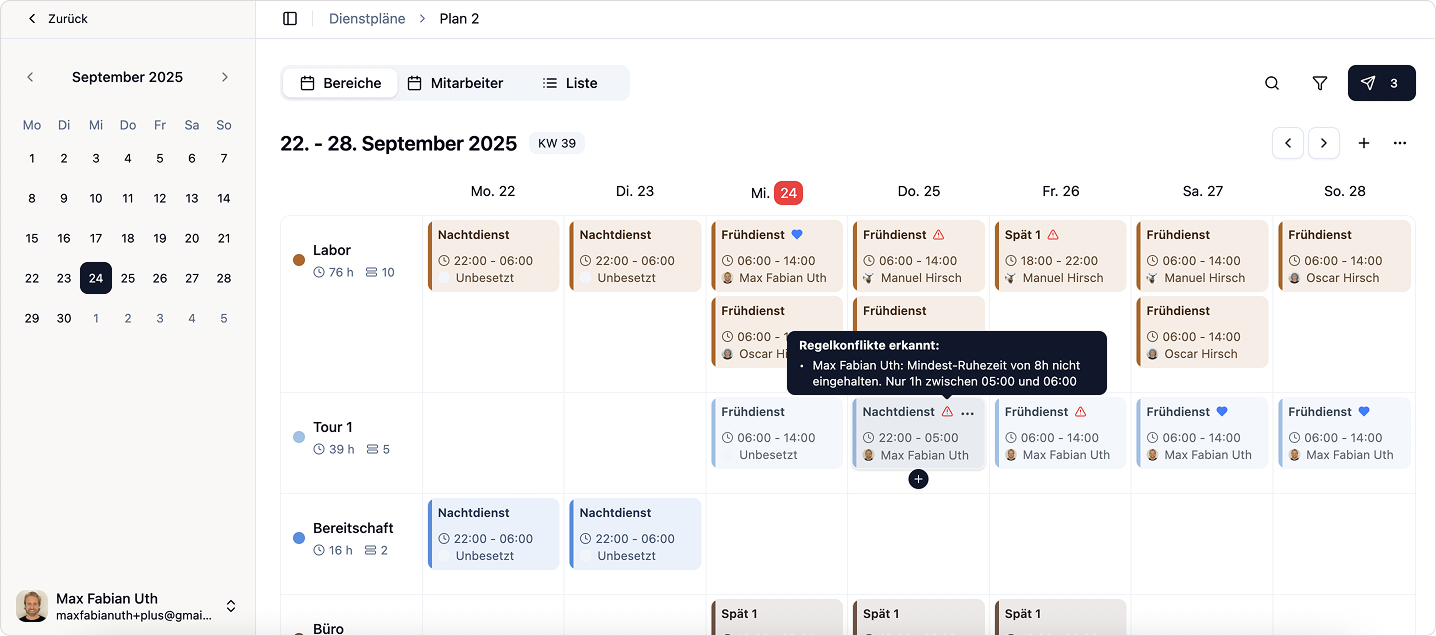
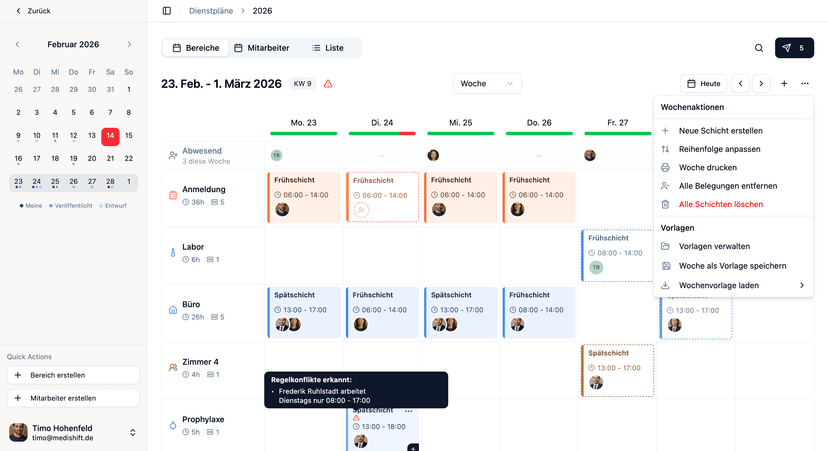
To be honest, rather than managing your personnel capacity planning with an Excel template, you should go straight for a digital solution. Excel spreadsheets are error-prone, not updateable in real time, and ultimately cost you more time than they save. A specialized software like medishift connects your shift scheduling with absence management and gives you a better overview of your staffing levels -- without the manual upkeep.
Optimizing Staff Planning: Aligning Capacity with Patient Volume
The real art of personnel capacity planning lies in dynamically adjusting your staffing levels to actual patient volume. Static schedules that look the same every week ignore reality: Mondays are typically busier than Fridays, flu season brings different demands than summer, and school holiday periods noticeably shift patient volume.
The first step: Identify seasonal patterns. Analyze your patient numbers from the last two to three years. In which months do more patients come? Are there day-of-week patterns? How does volume distribute throughout the day? This data is invaluable because it allows you to adjust your staffing plan proactively instead of reacting to bottlenecks after the fact.
The second step: Plan consultation hours based on data. If you know that Tuesdays and Thursdays have the highest patient volume, those days should have the strongest staffing. Move administrative tasks, team meetings, and training sessions to less busy times.
The third step: Use flexible working time models. Not every medical assistant needs to work 8 AM to 5 PM. Staggered start times, split shifts, or targeted part-time models that cover exactly the peak hours are far more efficient than rigid full-time schedules. This way you can optimize your staff planning without having to create additional positions.
The 5 Most Common Capacity Planning Mistakes -- and How to Avoid Them
From working with hundreds of medical practices, we know the typical pitfalls in capacity planning. Here are the five most common mistakes:
1. Planning by gut feeling instead of data. The problem: "We've always done it this way" is not a valid planning criterion. Without data, you're planning in the dark. The solution: Systematically track your appointment volume per time of day and day of the week for at least four weeks. Even this simple data foundation will fundamentally change your planning.
2. Missing buffer times. The problem: A schedule that works at 100% utilization breaks down at the first disruption -- and disruptions happen daily. The solution: Always plan with a 10--15% buffer. That means: if you mathematically need two medical assistants, plan for 2.3 assistant capacity. In practice, you achieve this through overlapping shift times.
3. Not accounting for qualifications. The problem: Three assistants on duty are useless if none of them can perform the spirometry scheduled for the afternoon. The solution: Maintain a qualification matrix and cross-reference it with the appointment schedule during every roster planning cycle.
4. No regular reviews. The problem: The capacity plan from six months ago no longer fits because patient numbers, team composition, or the range of services have changed. The solution: Review your personnel capacity planning at least quarterly -- monthly is even better. Adapt it to changing conditions.
5. Accepting overwork as the norm. The problem: When overtime is a permanent fixture and the team consistently works at full tilt, it starts to feel "normal" -- until the first colleague hands in their resignation. The solution: Take overload signals seriously. If staff utilization consistently exceeds 90%, you need either more staff, fewer appointments, or more efficient processes. You can find more on optimizing practice organization in our detailed guide.
From Manual Planning to Automated Solutions
Manual personnel capacity planning -- whether with Excel, paper, or a whiteboard -- has one critical drawback: it's always backward-looking and reactive. You plan based on past values and only notice something is off while operations are already underway.
Modern software solutions fundamentally change this approach. A specialized solution for staff planning in your practice connects your shift schedule with absence management into a clear overall picture of your staffing. Instead of typing numbers into a spreadsheet and checking formulas, you can see at a glance whether your shift coverage matches the planned practice operations.
The advantages over manual processes are significant:
- Real-time data: Every sick call, every appointment change feeds immediately into the capacity calculation.
- Automatic suggestions: The software detects under- or overstaffing and suggests adjustments.
- Notifications: You're proactively informed when staffing falls below a critical threshold.
- Integration with shift scheduling: Capacity planning and shift scheduling in your practice mesh seamlessly -- no duplicate data entry, no inconsistencies.
- Data-driven forecasts: Based on historical data, the software can identify patterns and help you predict future needs.
At medishift, we've built our solution with exactly these challenges in mind. Our tool connects shift scheduling and absence management in a single, intuitive app -- so that your workforce planning doesn't have to be something you do alongside running the practice, but integrates seamlessly into your daily routine. And the best part: You can try medishift for free and see for yourself.

Try Medishift for free now!
- Modern duty planning in just minutes
- Automated workflows for your practice
- Forever free for up to 10 employees
Frequently Asked Questions About Personnel Capacity Planning
Conclusion: Personnel Capacity Planning as a Competitive Advantage for Your Practice
Personnel capacity planning is not a one-time task that you check off and forget about. It's an ongoing process that evolves with your practice. The effort pays off: practices that approach their resource planning systematically report fewer overtime hours, more satisfied employees, and shorter patient wait times.
Here are the key takeaways from this article at a glance:
- Personnel capacity planning encompasses three dimensions: quantitative, qualitative, and temporal. Only when you consider all three together are you truly planning efficiently.
- Calculating staff utilization is the first step. A target range of 80--90% offers the ideal balance between efficiency and buffer.
- Excel templates are a good starting point but quickly reach their limits as your practice grows. Error susceptibility, missing real-time data, and lack of integration make them a transitional solution at best.
- Optimizing staff planning means above all: planning based on data instead of gut feeling, building in buffer times, and reviewing regularly.
- Modern software solutions like medishift connect shift scheduling and absence management to support your practice management.
Whether you start today with a simple Excel spreadsheet or go straight for a digital solution -- the most important step is the first one. Begin systematically recording your patient numbers and staffing capacity. The data will show you where the levers are. Your team and your patients will thank you for it.